Making Healthy Living Easier With Olive
Making Healthy Living Easier With Olive
Passion Project | UX/UI Design
Passion Project | UX/UI Design
About
Many health apps feel overwhelming and impersonal.
Olive is a wellness app designed to simplify health tracking through personalization, clarity, and community.
As a mother with a young child, I found it hard to make time for health. All I needed was a simple tool that would bring everything together in one place.
So I created Olive, a clear, easy-to-use app that makes it easier to stay on track and feel supported.
About
Many health apps feel overwhelming and impersonal.
Olive is a wellness app designed to simplify health tracking through personalization, clarity, and community.
As a mother with a young child, I found it hard to make time for health. All I needed was a simple tool that would bring everything together in one place.
So I created Olive, a clear, easy-to-use app that makes it easier to stay on track and feel supported.
Project
Native App Design
Role
UX/UI Design:
Research, Ideation, Prototyping, User Testing, Visual Design
Duration
6 months
Project
Native App Design
Role
UX/UI Design:
Research, Ideation, Prototyping, Visual Design
Duration
6 months
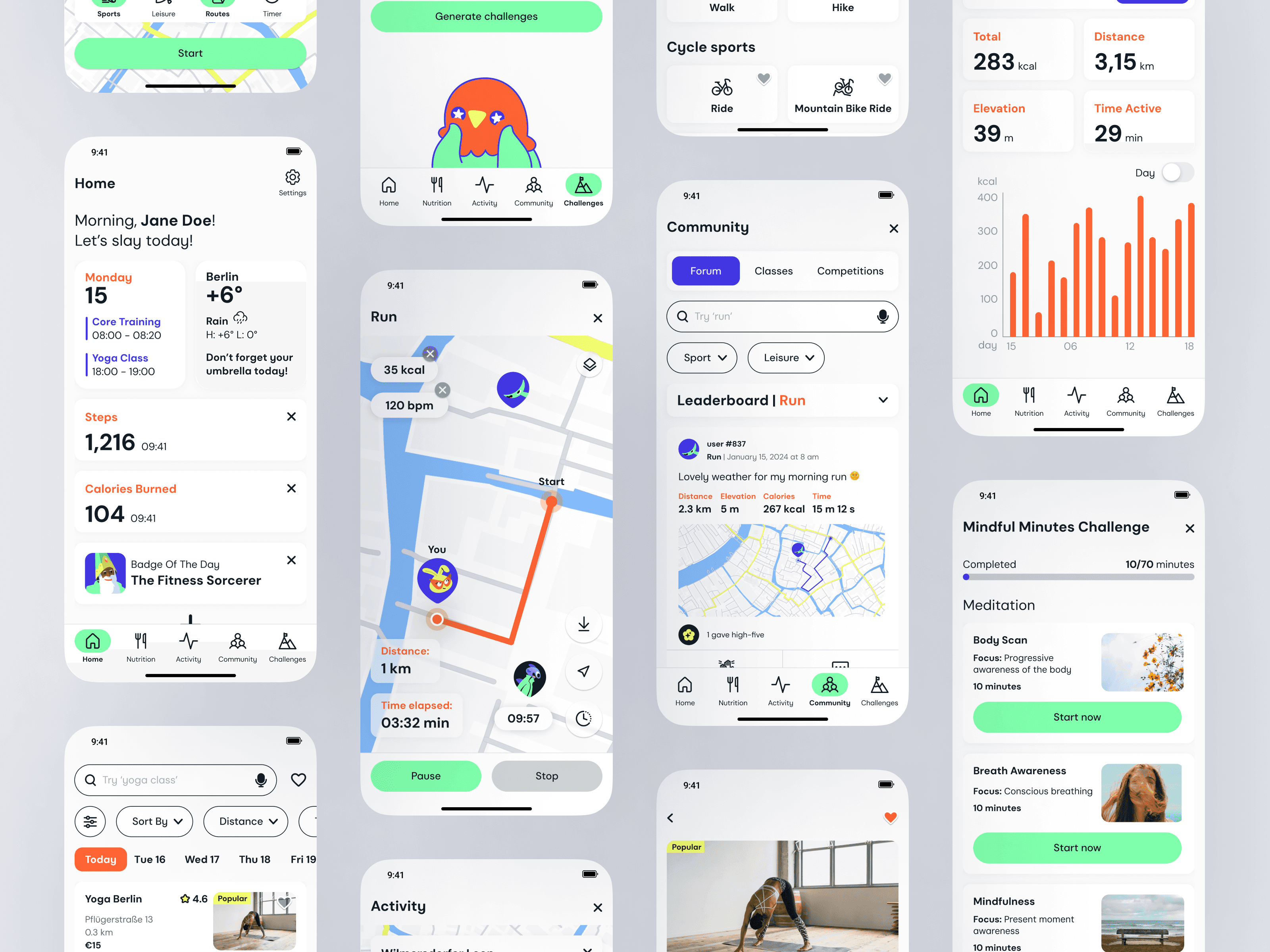

“Approximately 31% of the global population aged ≥15 years engages in insufficient physical activity, and it is known to contribute to the death of approximately 3.2 million people every year”
“Approximately 31% of the global population aged ≥15 years engages in insufficient physical activity, and it is known to contribute to the death of approximately 3.2 million people every year”
("World Health Organization," 2018)
Problem
Problem
In today’s always-connected world, many people feel overwhelmed and find it hard to stay healthy, while most wellness apps are too complicated or don’t feel personal enough to help.
In today’s always-connected world, many people feel overwhelmed and find it hard to stay healthy, while most wellness apps are too complicated or don’t feel personal enough to help.
Business Goal
Business Goal
Create a simple, inclusive health platform that engages busy users and drives long-term retention by offering real value for their time and effort.
Create a simple, inclusive health platform that engages busy users and drives long-term retention by offering real value for their time and effort.
Solution
Solution
Build an all-in-one wellness app that simplifies health tracking, gamifies progress, and fosters a supportive, motivating community.
Build an all-in-one wellness app that simplifies health tracking, gamifies progress, and fosters a supportive, motivating community.
Discovery
Discovery
What About The Competition?
What About The Competition?
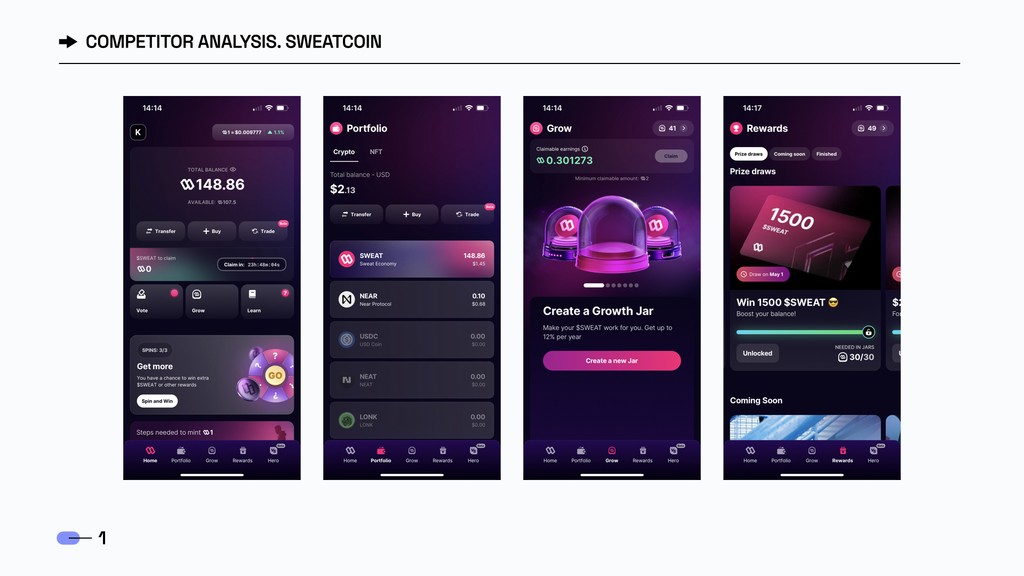
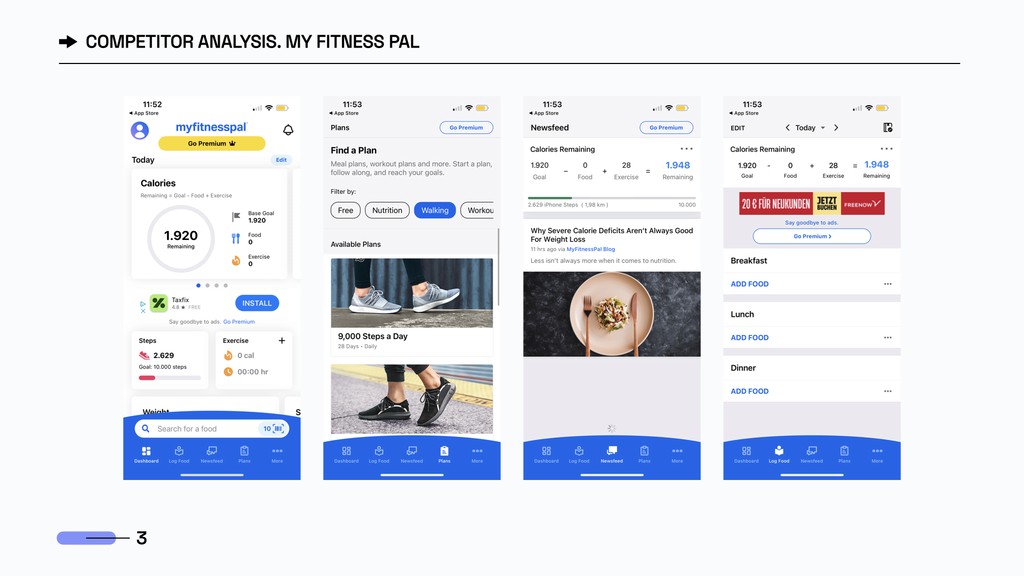
Staying healthy takes time and effort, so at first, I thought giving users money would help keep them motivated. I looked at apps like Sweatcoin, which turns your steps into ca$h, but user feedback showed this wasn’t the right path for Olive. People wanted something more meaningful.
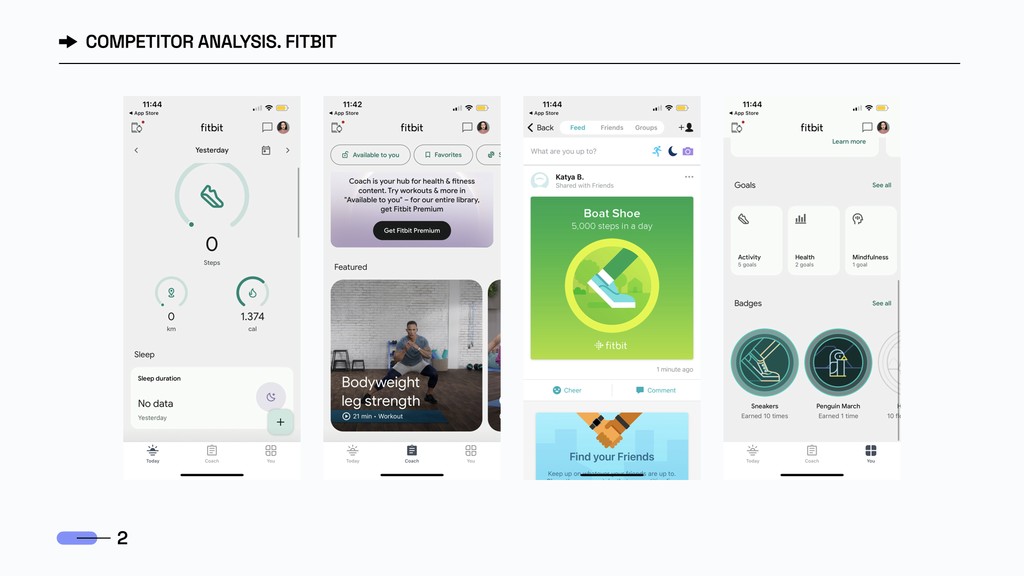
I then looked at Fitbit and MyFitnessPal, which offer strong health tracking but fall short on personalization and user experience. These insights helped shape Olive into a simpler, more supportive wellness app.
Staying healthy takes time and effort, so at first,
I thought giving users money would help keep them motivated. I looked at apps like Sweatcoin, which turns your steps into ca$h, but user feedback showed this wasn’t the right path for Olive. People wanted something more meaningful.
I then looked at Fitbit and MyFitnessPal, which offer strong health tracking but fall short on personalization and user experience. These insights helped shape Olive into a simpler, more supportive wellness app.
User Research
User Research
I ran guerilla user research to quickly gather valuable insights that helped shape Olive. Through the user interviews, I was able to find out about the users’ favourite apps (and use them as references for Olive), daily habits, level of fitness, daily schedule, and other key details.
After analyzing the data with digital affinity mapping, I identified six core insights to guide the design.
I ran guerilla user research to quickly gather valuable insights that helped shape Olive. Through the user interviews, I was able to find out about the users’ favourite apps (and use them as references for Olive), daily habits, level of fitness, daily schedule, and other key details.
After analyzing the data with digital affinity mapping, I identified six core insights to guide the design.
Seamless Tracking
Seamless Tracking
Interviewees want a smooth, effortless way to track their progress and activities.
Interviewees want a smooth, effortless way to track their progress & activities.
Holistic Health & Wellness Features
Holistic Health &
Wellness Features
Users want mood tracking, water intake, and personalized diet tips to support a holistic approach to health.
Users want mood tracking, water intake, and personalized diet tips to support a holistic approach to health.
Personalization
& Learning
Personalization & Learning
Users value AI that recommends efficient workouts and supports their drive for continuous learning.
Users value AI that recommends efficient workouts and supports their drive for continuous learning.
Enhanced Workout Experience & Path Suggestions
Enhanced Workout Experience & Path Suggestions
Users appreciate activity maps with distance, location, and path suggestions by difficulty.
Users appreciate activity maps with distance, location, and path suggestions by difficulty.
Simplicity, Efficiency,
& Customization
Simplicity, Efficiency,
& Customization
Users prefer stable, easy-to-use apps with clear labels, customization, clean design, and effective search.
Users prefer stable, easy-to-use apps with clear labels, customization, clean design, and effective search.
Access to Sports Info
& Community
Access to Sports Info & Community
Access to Sports Info
& Community
Users want updates on sports trends, events, and classes, highlighting the value of community and staying informed.
Users want updates on sports trends, events, and classes, highlighting the value of community and staying informed.
“I don’t like to be pressured to complete a specific goal. I just want to be physically and mentally healthy in general.”
“I don’t like to be pressured to complete a specific goal. I just want to be physically and mentally healthy
in general.”
Definition
Definition
User Personas
User Personas
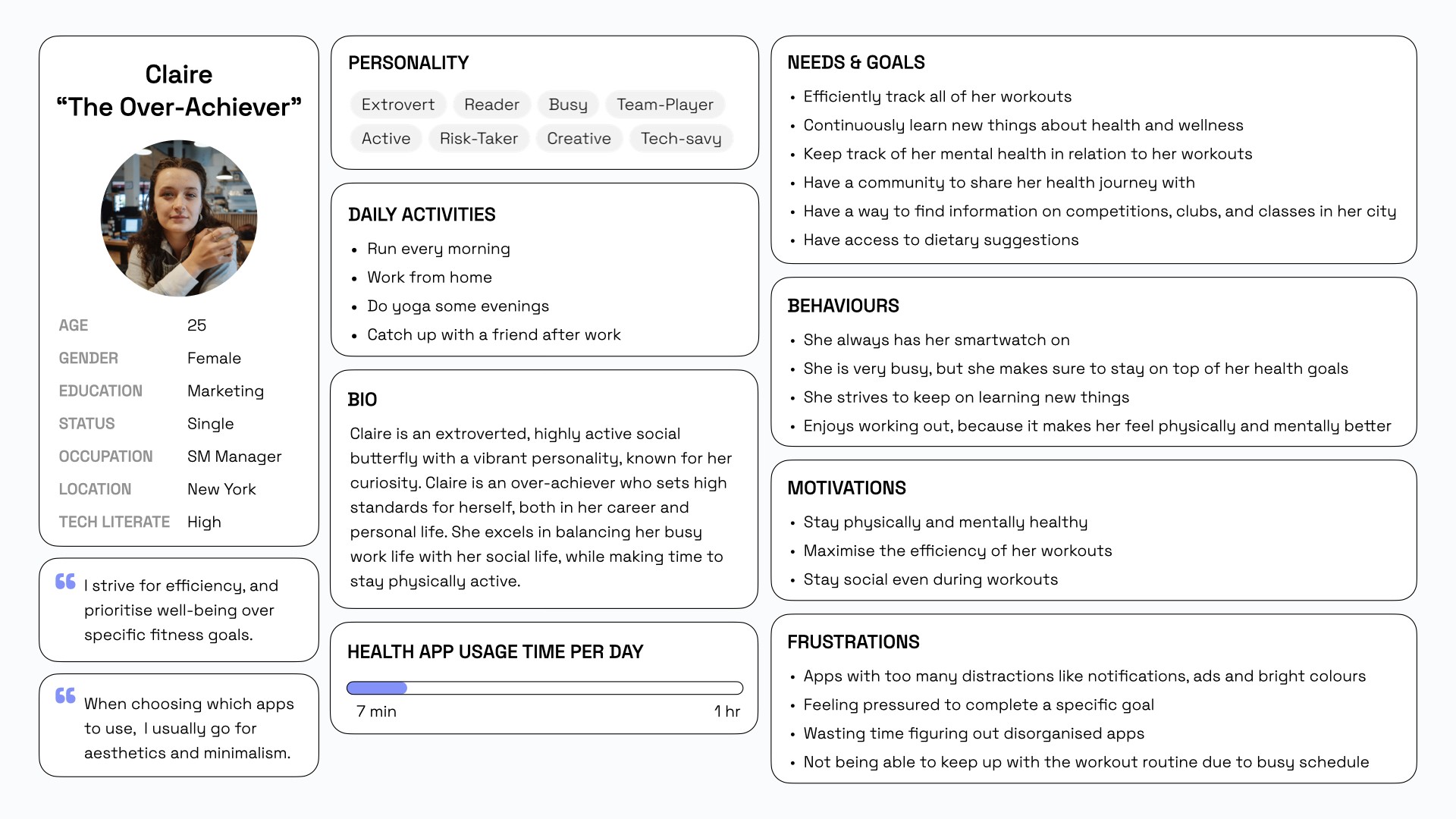
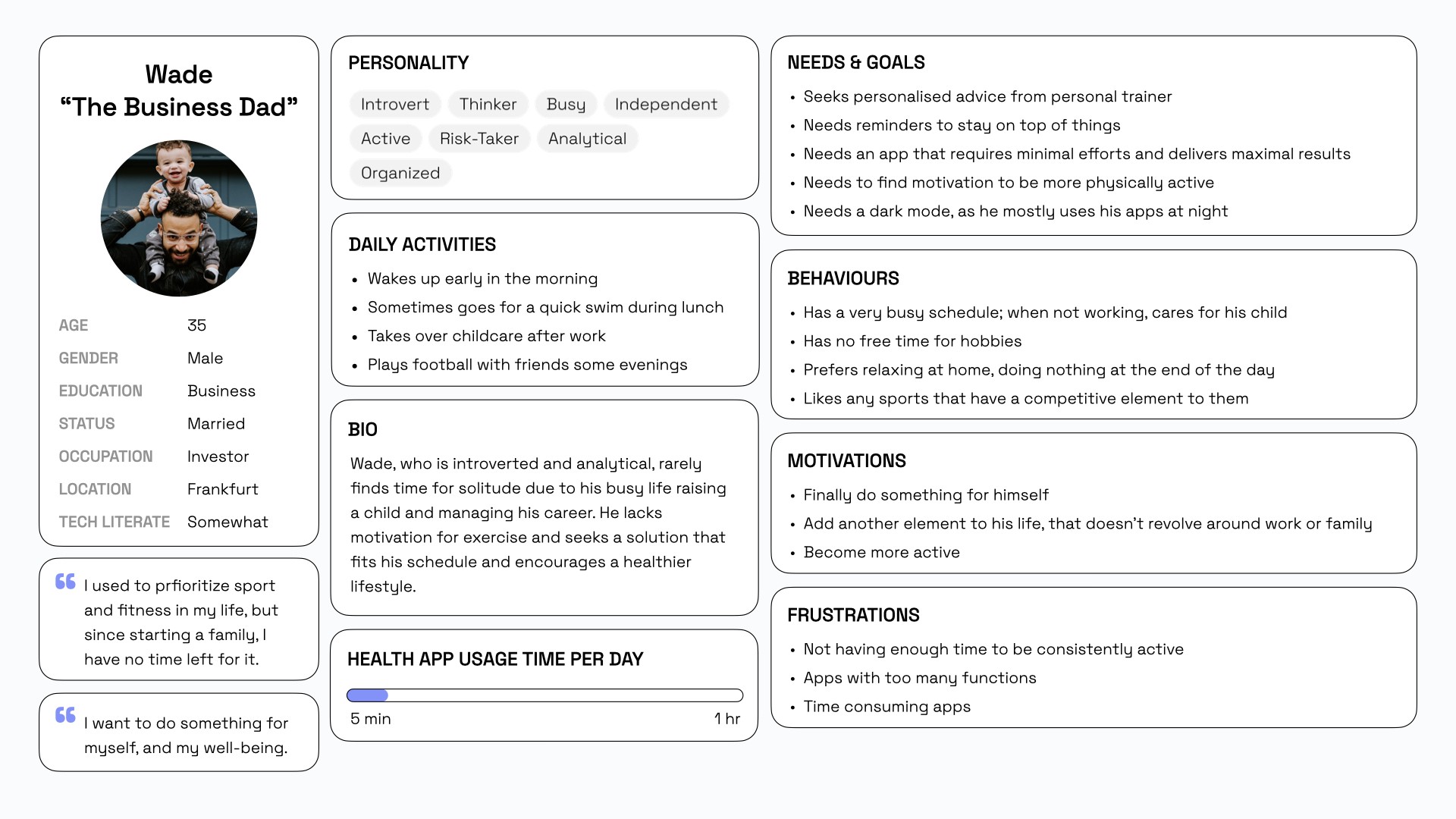
After conducting the user interviews I defined two primary user personas: Claire “The Over-Achiever” and Wade “The Business Dad”. These personas helped turn research into real users.
Claire, a driven Gen Z professional, juggles work, social life, and wellness, and wants an app that fits into her fast-paced schedule.
Wade, a Millennial dad and busy professional, is looking for something that supports his self-care goals without taking time away from his family.
After conducting the user interviews I defined two primary user personas: Claire “The Over-Achiever” and Wade “The Business Dad”. These personas helped turn research into real users.
Claire, a driven Gen Z professional, juggles work, social life, and wellness, and wants an app that fits into her fast-paced schedule.
Wade, a Millennial dad and busy professional, is looking for something that supports his self-care goals without taking time away from his family.
User Flows
User Flows
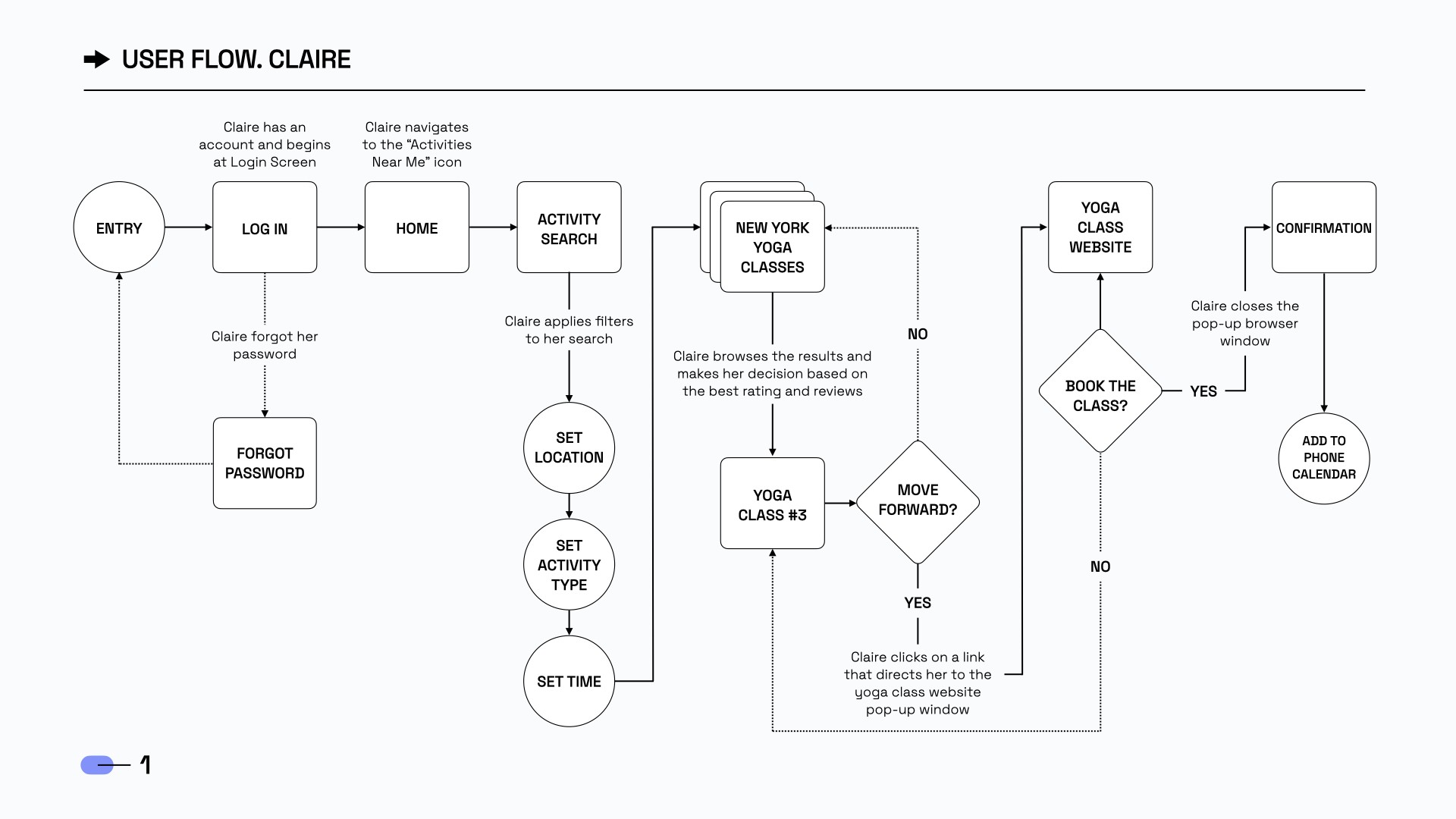
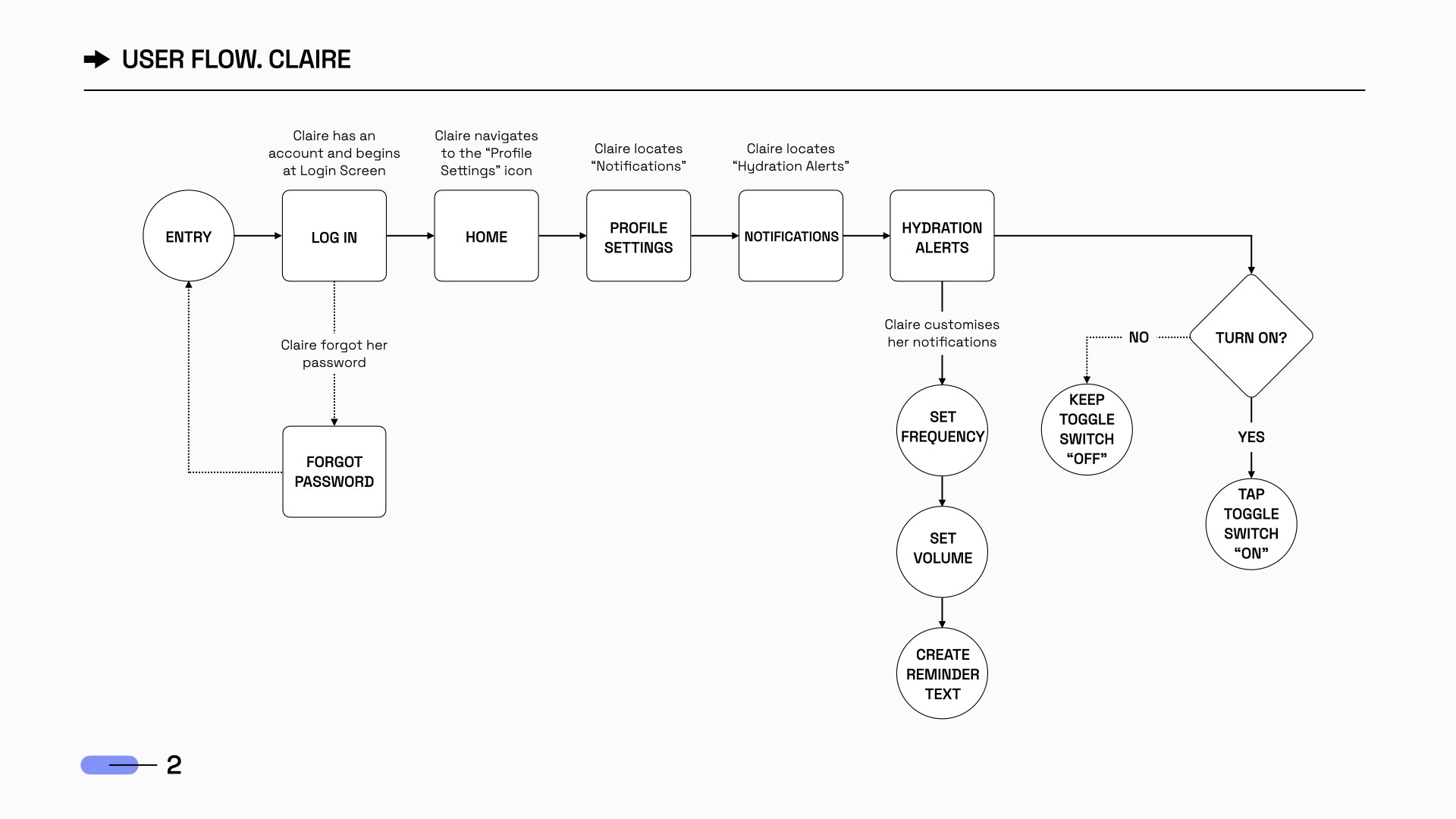
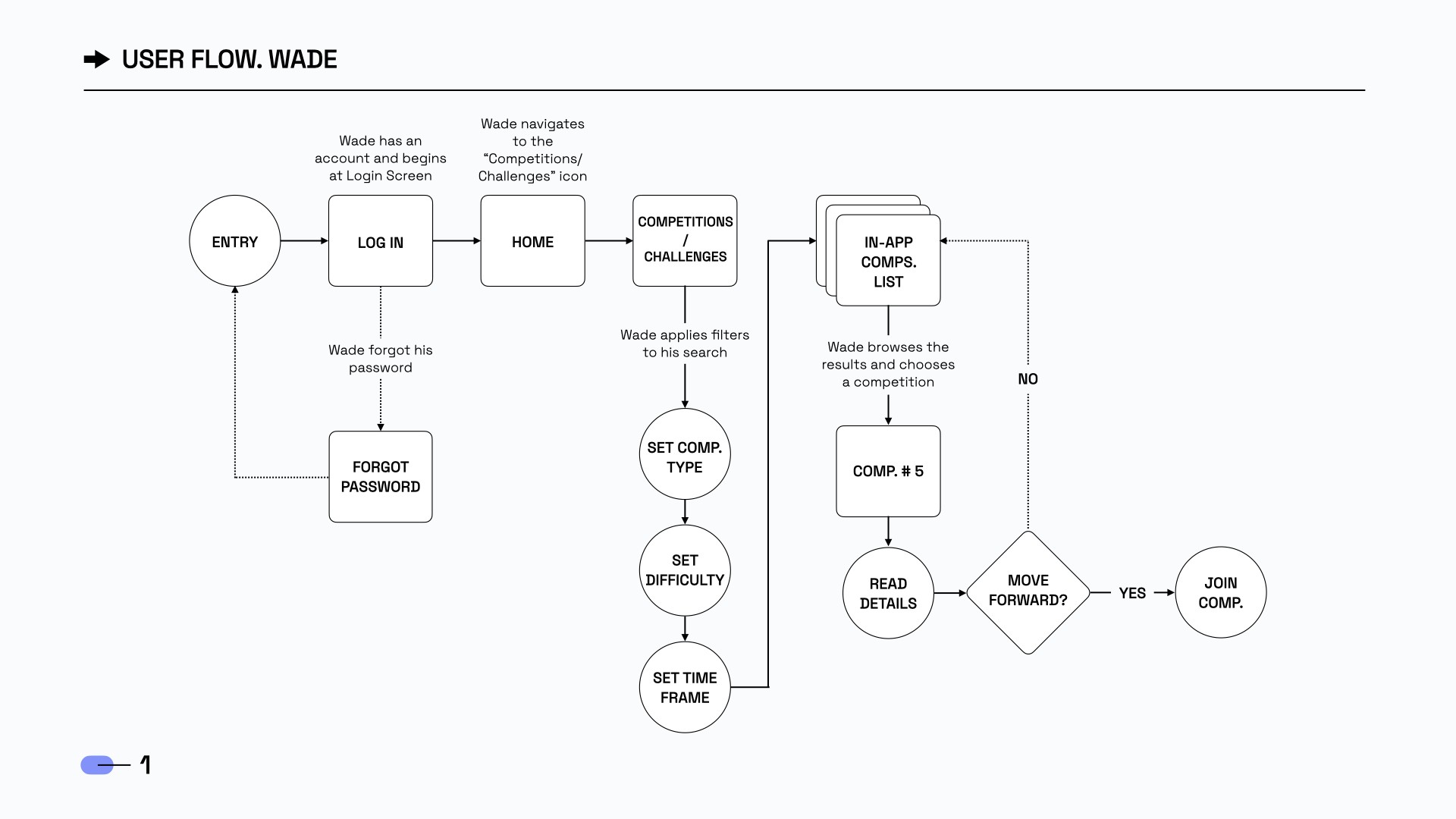
These flows had to be flowing! So I created three user flows tailored to Claire and Wade’s needs: fast, efficient for Claire’s busy pace, and simple, seamless for Wade’s family-focused routine. Each step is designed to feel intuitive and purposeful, keeping users engaged and making wellness easy to stick with.
These flows had to be flowing! So I created three user flows tailored to Claire and Wade’s needs: fast, efficient for Claire’s busy pace, and simple, seamless for Wade’s family-focused routine. Each step is designed to feel intuitive and purposeful, keeping users engaged and making wellness easy to stick with.
Ideation
Ideation
Information Architecture
Information Architecture
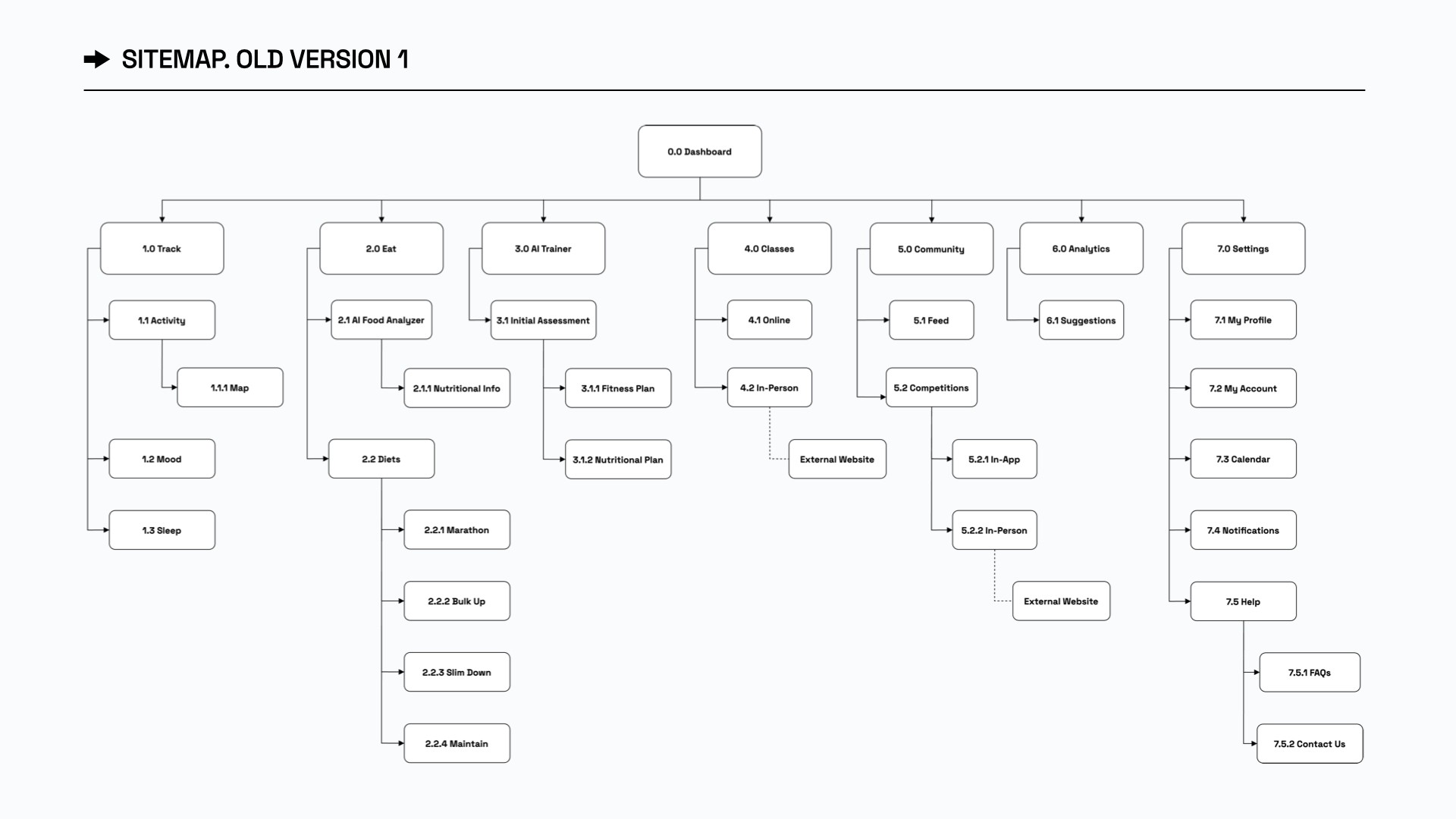
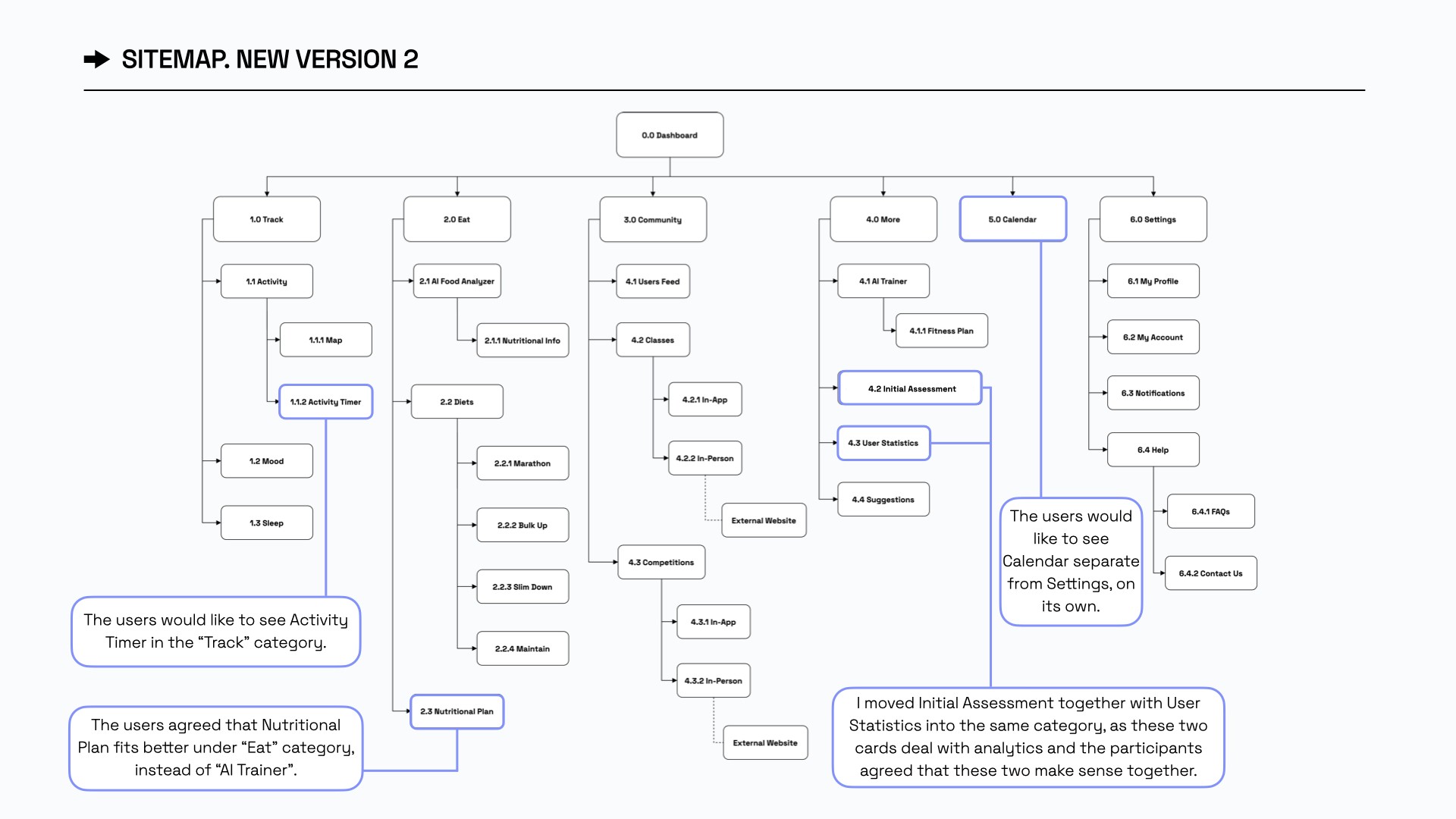
After defining user flows, I created a sitemap to structure Olive’s navigation. Based on card sorting results, I refined it to match how users naturally find and group information.
After defining user flows, I created a sitemap to structure Olive’s navigation. Based on card sorting results, I refined it to match how users naturally find and group information.
Ma Vision Créative
Ma Vision Créative
While sketching Olive’s first screens, I focused on user needs and research insights.
Three key features were prioritized:
Activity Tracker, AI Trainer, and Class Finder.
While sketching Olive’s first screens, I focused on user needs and research insights. I prioritized three key features:
Activity Tracker, AI Trainer, and Class Finder.
While sketching Olive’s first screens, I focused on user needs and research insights. Three key features were prioritized:
Activity Tracker, AI Trainer, Class Finder.
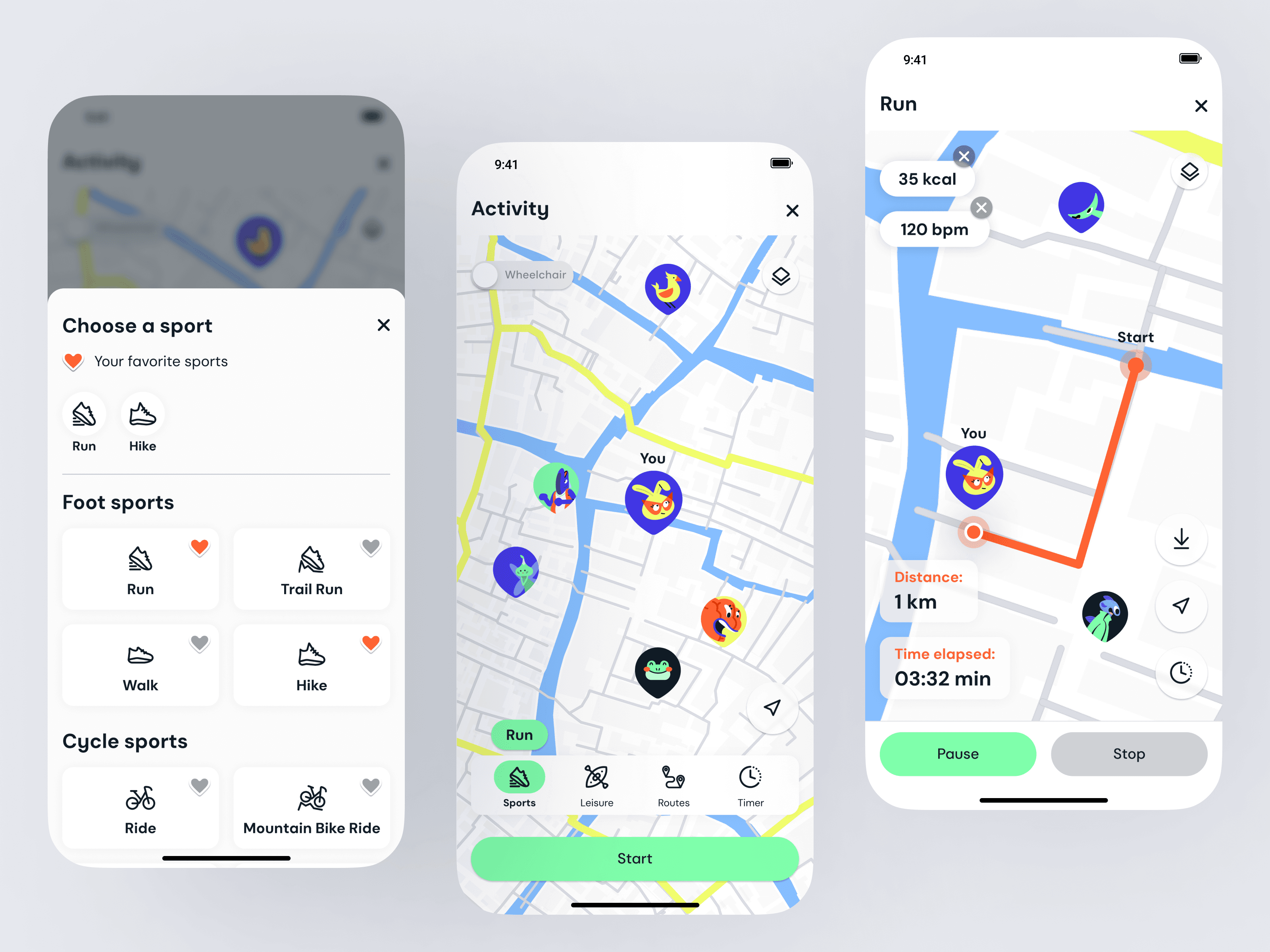
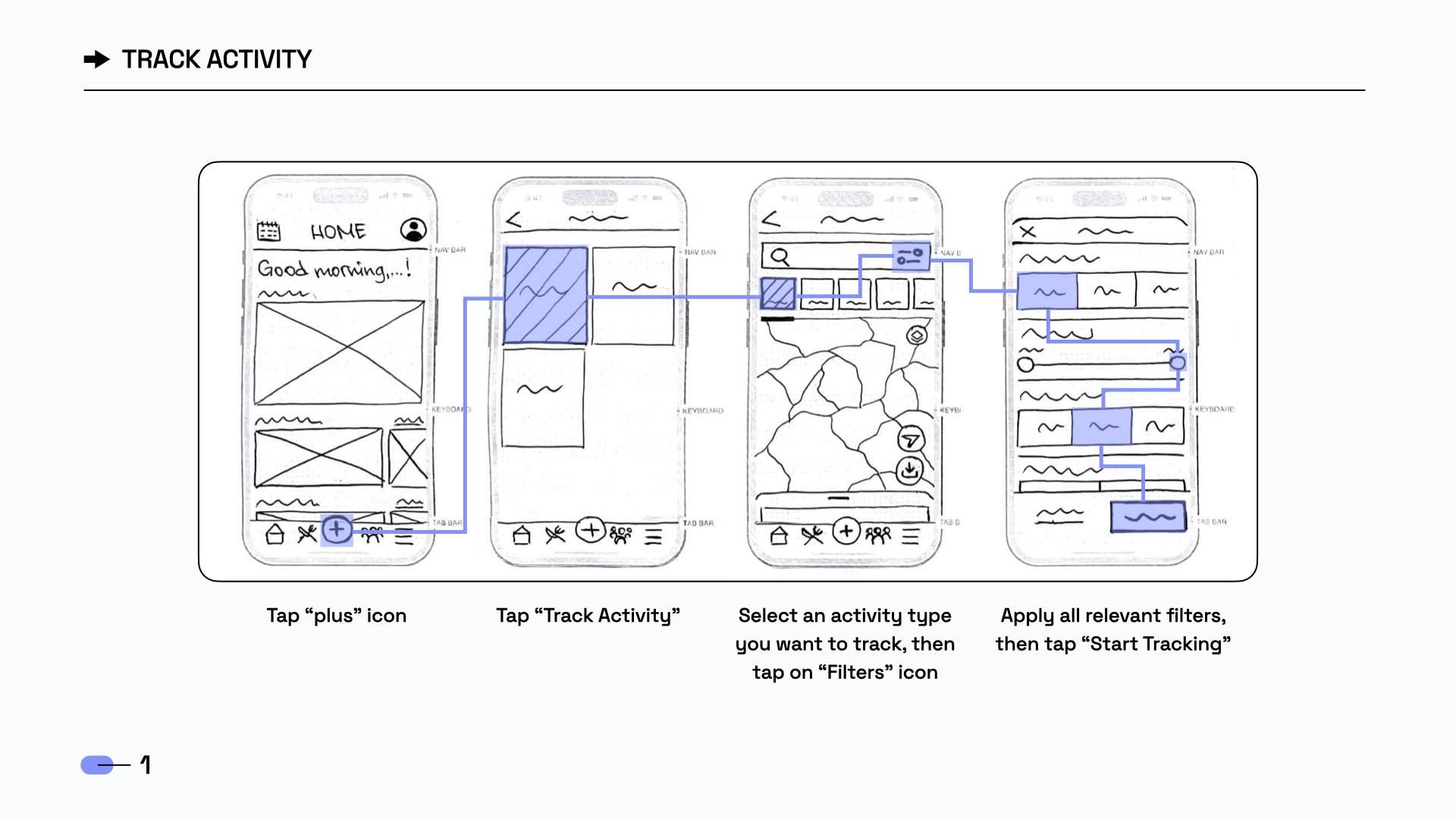
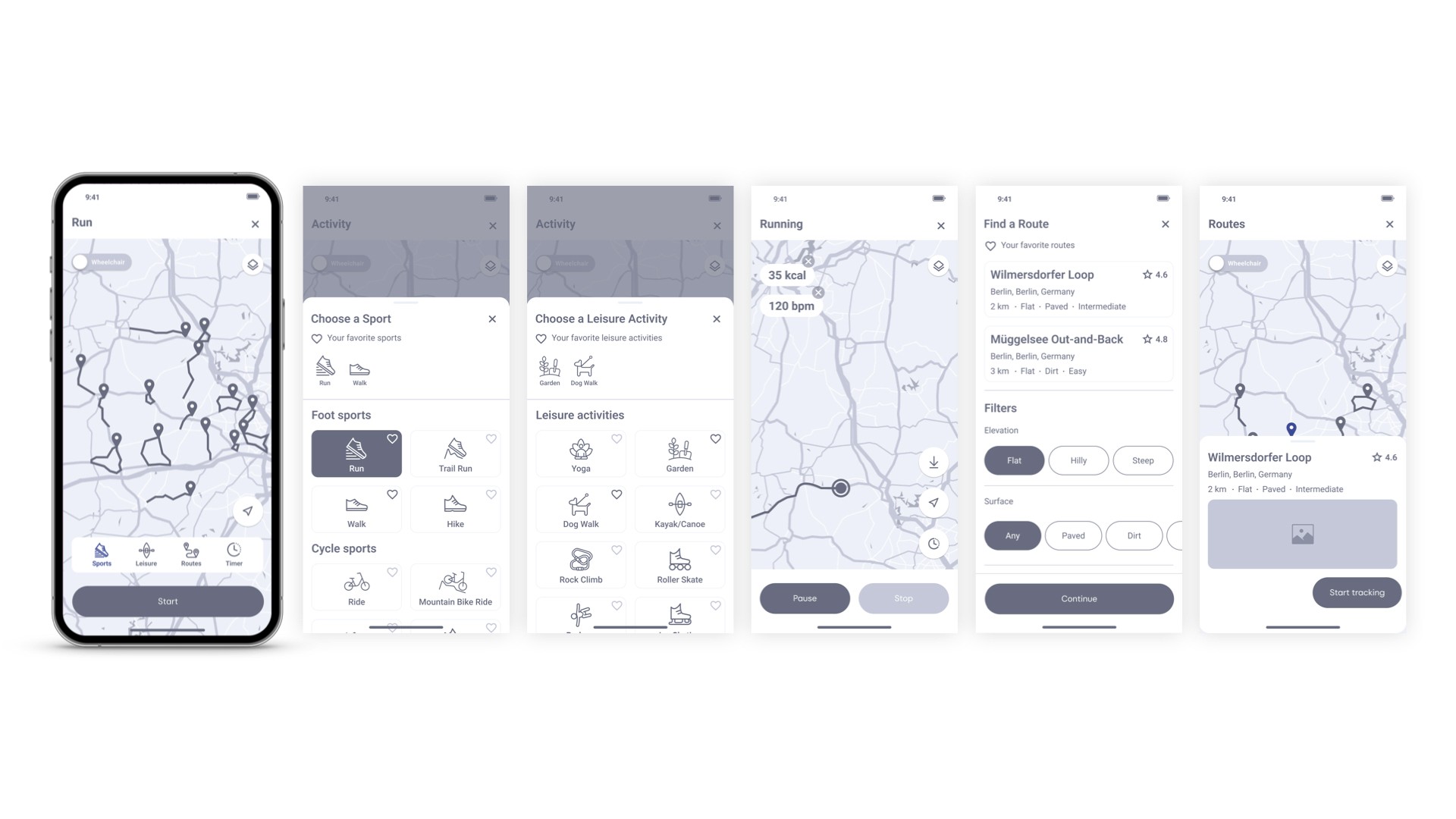
The Activity Tracker lets users track their physical activity (running, walking, etc).
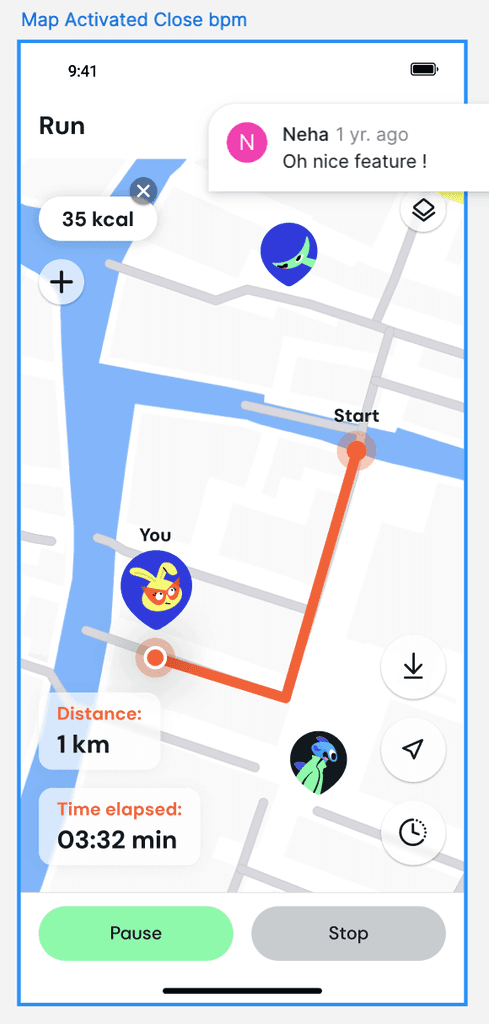
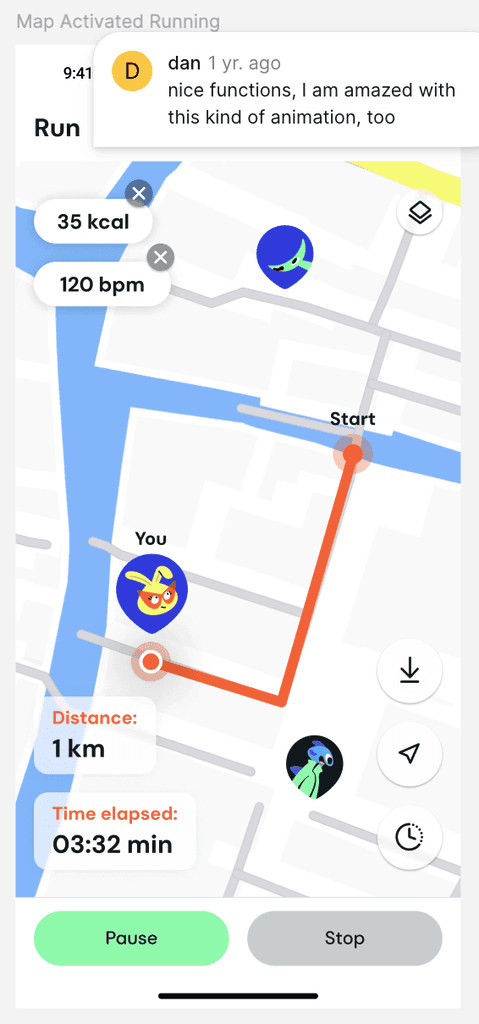
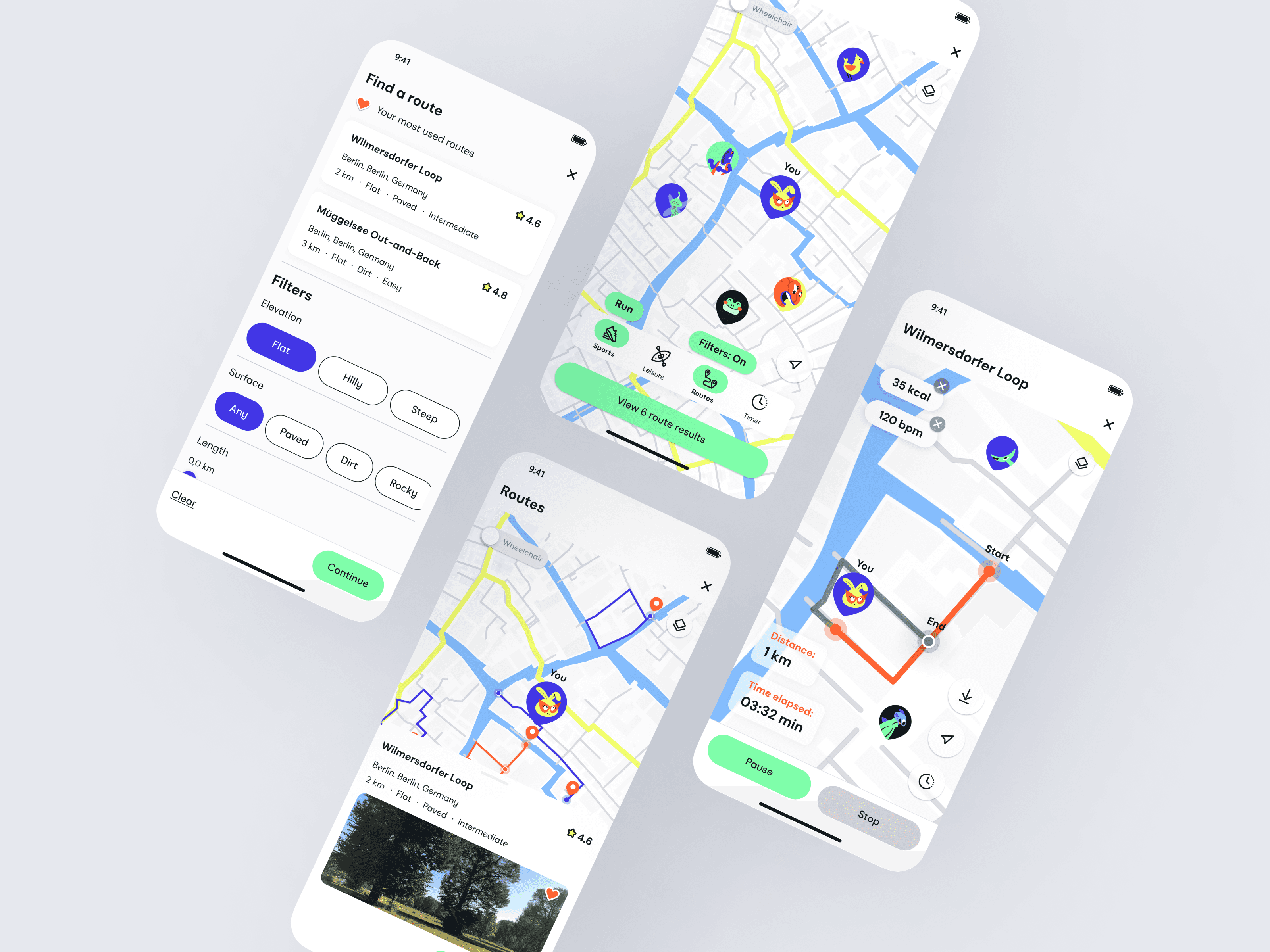
Based on user feedback, I integrated a map so users can view and track their routes in real time.
The Activity Tracker lets users track their physical activity (running, walking, etc).
Based on user feedback, I integrated a map so users can view and track their routes in real time.
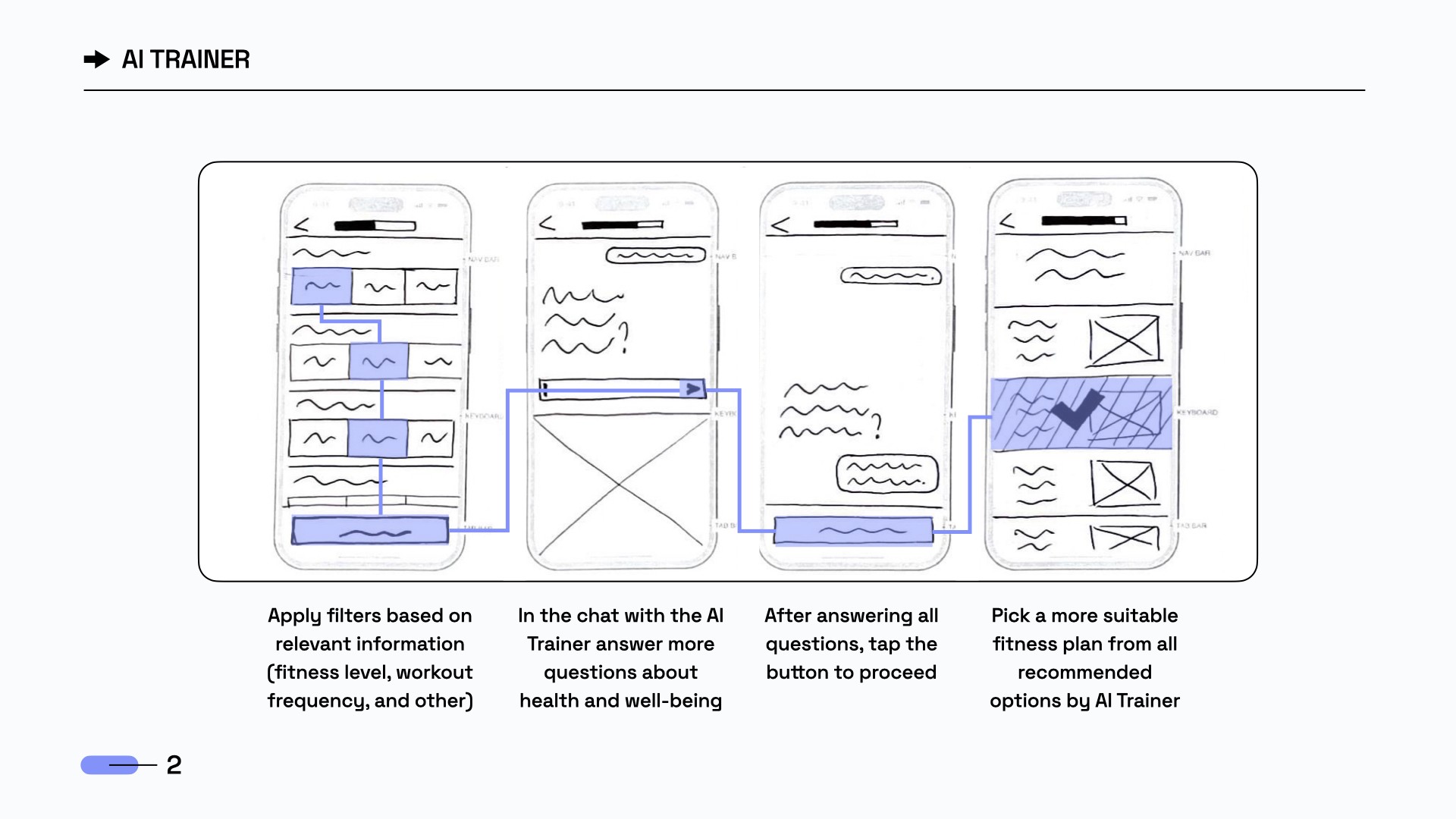
The AI Trainer offers users personalized fitness plans based on their input. Through filters and a chat feature, AI learns about the user's goals and suggests tailored plans to choose from.
User interviews showed a clear desire for an AI feature that feels personal and adapts to each user’s goals.
The AI Trainer offers users personalized fitness plans based on their input. Through filters and a chat feature, AI learns about the user's goals and suggests tailored plans to choose from.
User interviews showed a clear desire for an AI feature that feels personal and adapts to each user’s goals.
The AI Trainer offers users personalized fitness plans based on their input. Through filters and a chat feature, AI learns about the user's goals and suggests tailored plans to choose from.
User interviews showed a clear desire for an AI feature that feels personal and adapts to each user’s goals.
The AI Trainer offers users personalized fitness plans based on their input. Through filters and a chat feature, AI learns about the user's goals and suggests tailored plans to choose from.
User interviews showed a clear desire for an AI feature that feels personal and adapts to each user’s goals.
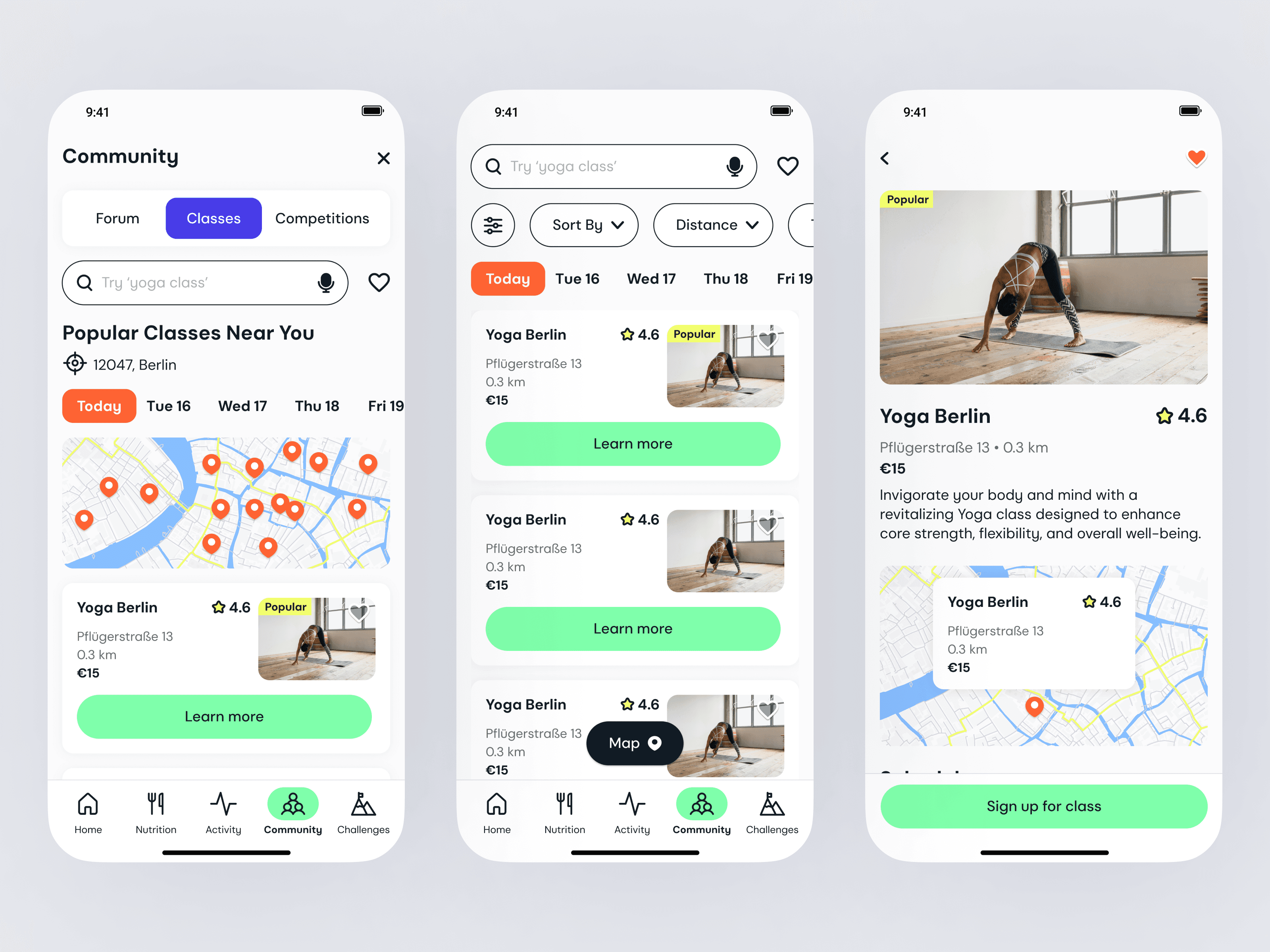
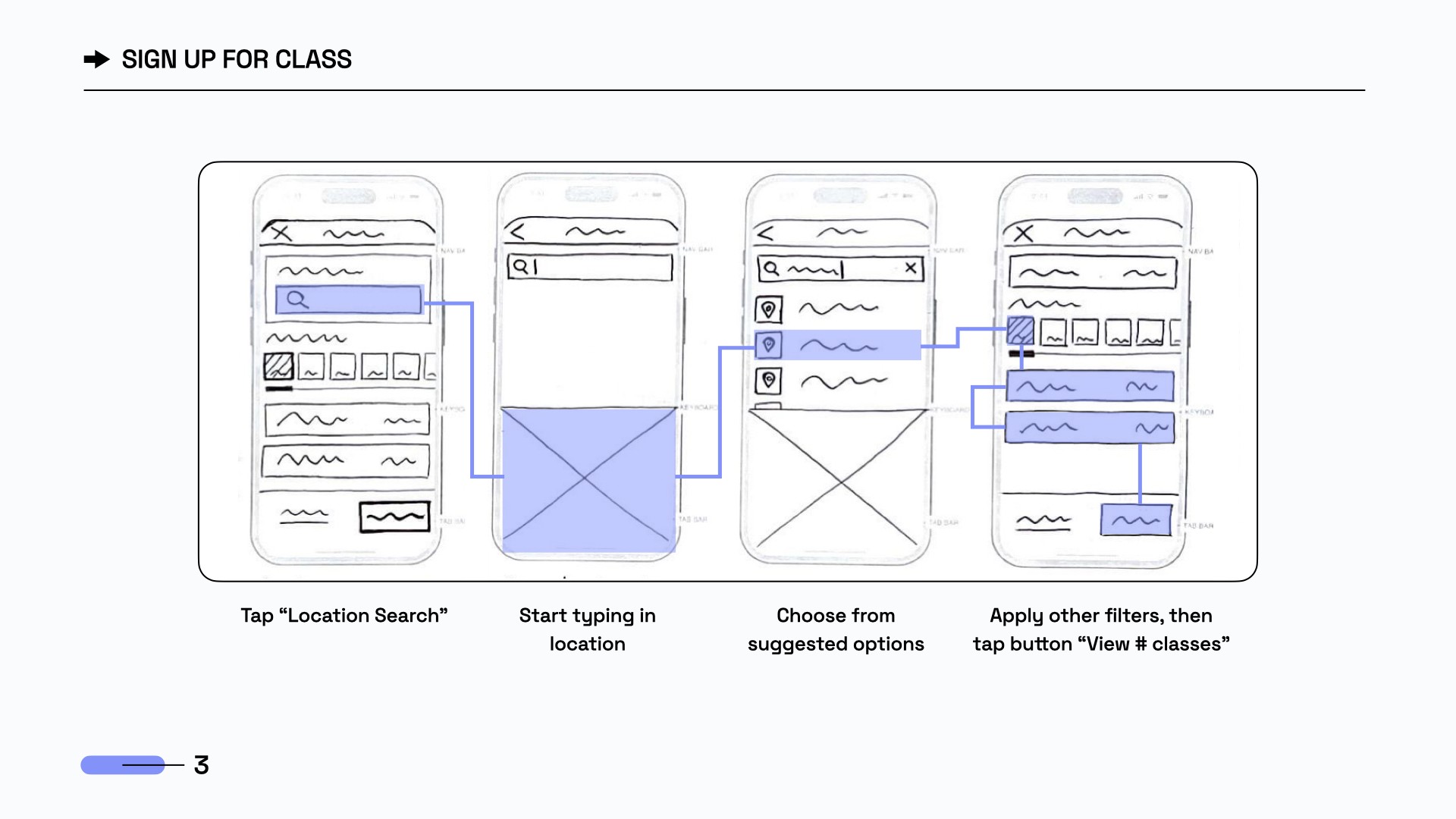
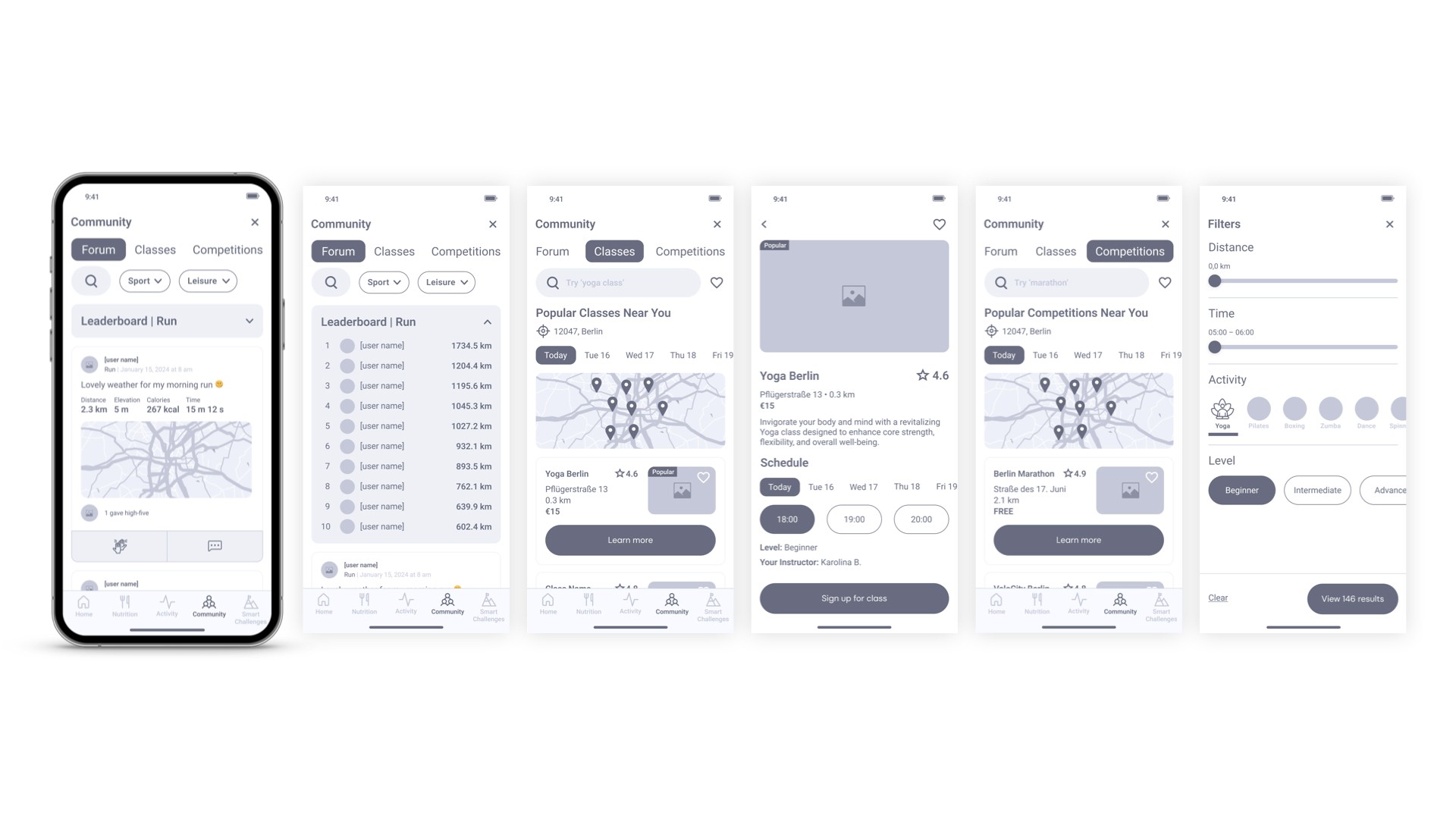
Class Finder is a convenient tool to help users find classes like yoga, HIIT, etc., based on location.
This feature reflects users’ desire for community and connection, as highlighted in user interviews.
Class Finder is a convenient tool to help users find classes like yoga, HIIT, etc., based on location.
This feature reflects users’ desire for community and connection, as highlighted in user interviews.
Class Finder is a convenient tool to help users find classes like yoga, HIIT, etc., based on location.
This feature reflects users’ desire for community and connection, as highlighted in user interviews.
Te-Te-Testing
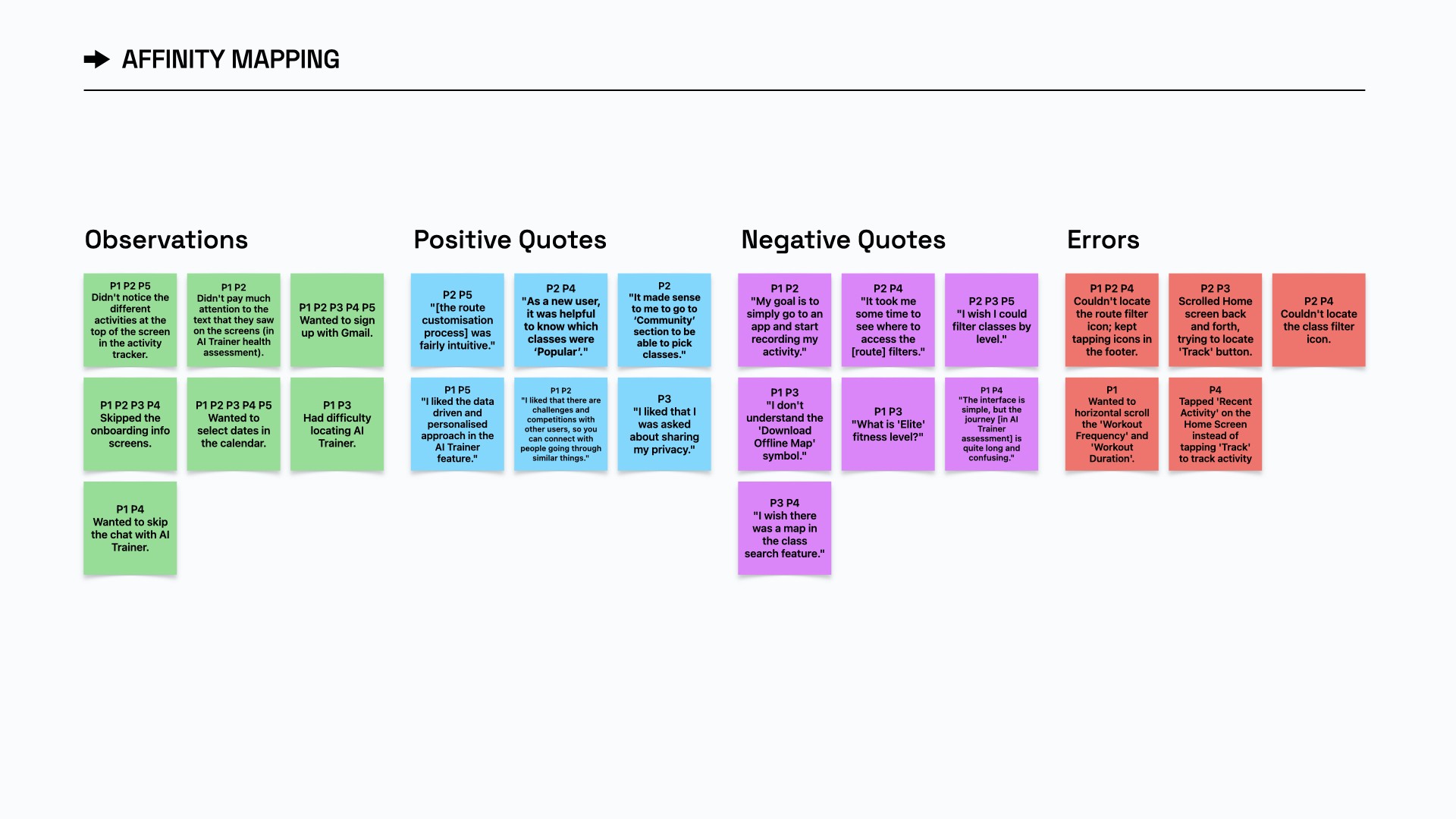
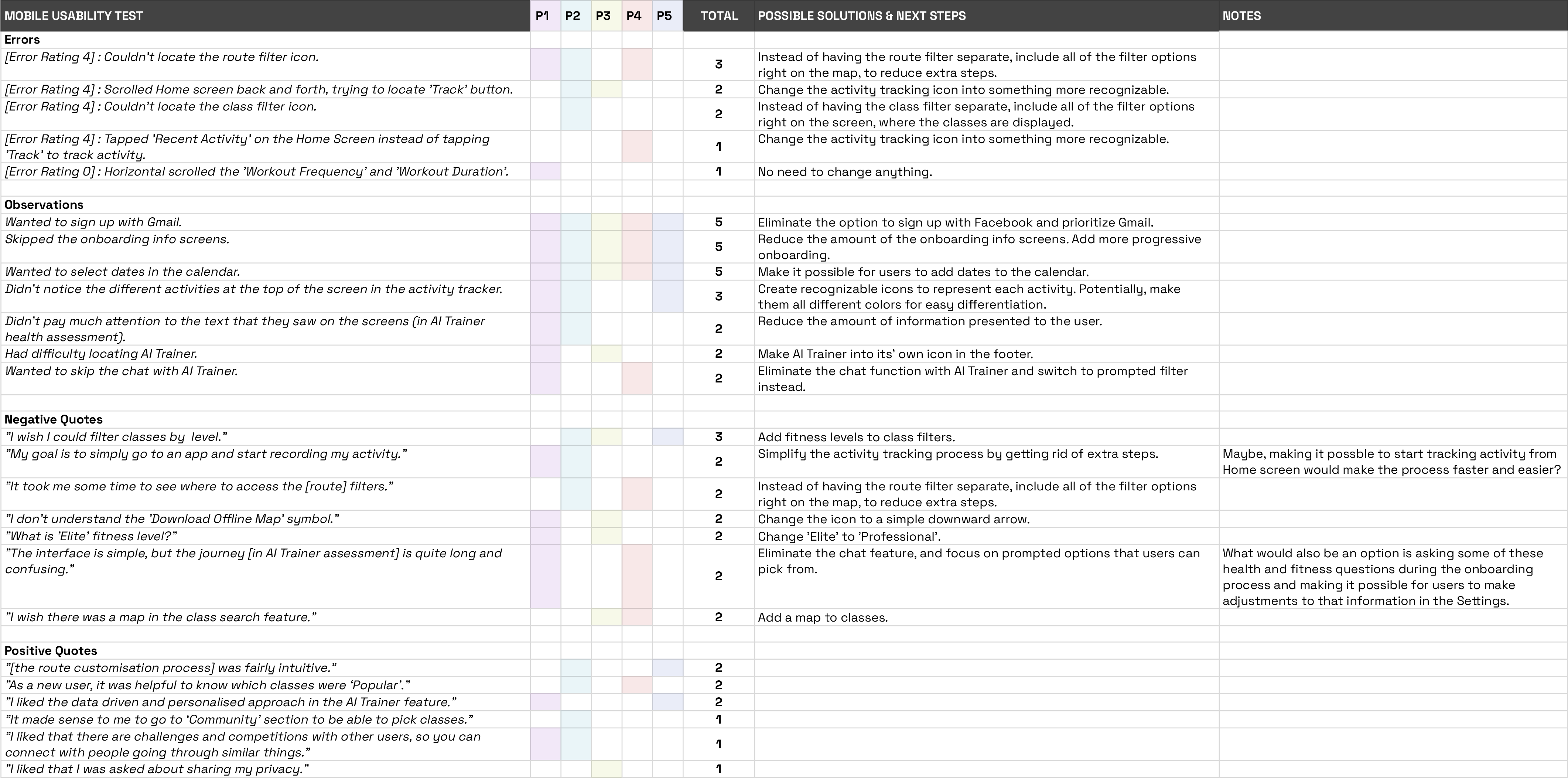
I ran in-person tests with 5 participants using the Figma app, capturing screen and facial reactions. Users wanted fully interactive screens and got frustrated when elements weren’t clickable. Using affinity mapping and a rainbow spreadsheet, I found key issues like: confusing AI Trainer features and unclear wording.
User testing showed that Olive wasn’t as intuitive or engaging as intended :( Its rich functionality often left users confused, highlighting the need for major improvements.
Lo-Finally!
After testing the sketches myself, I finally moved on to designing! Yay! My favorite part :)
The features were shaping up nicely in these lo-fi prototypes, creating a solid foundation for my first thorough user test.
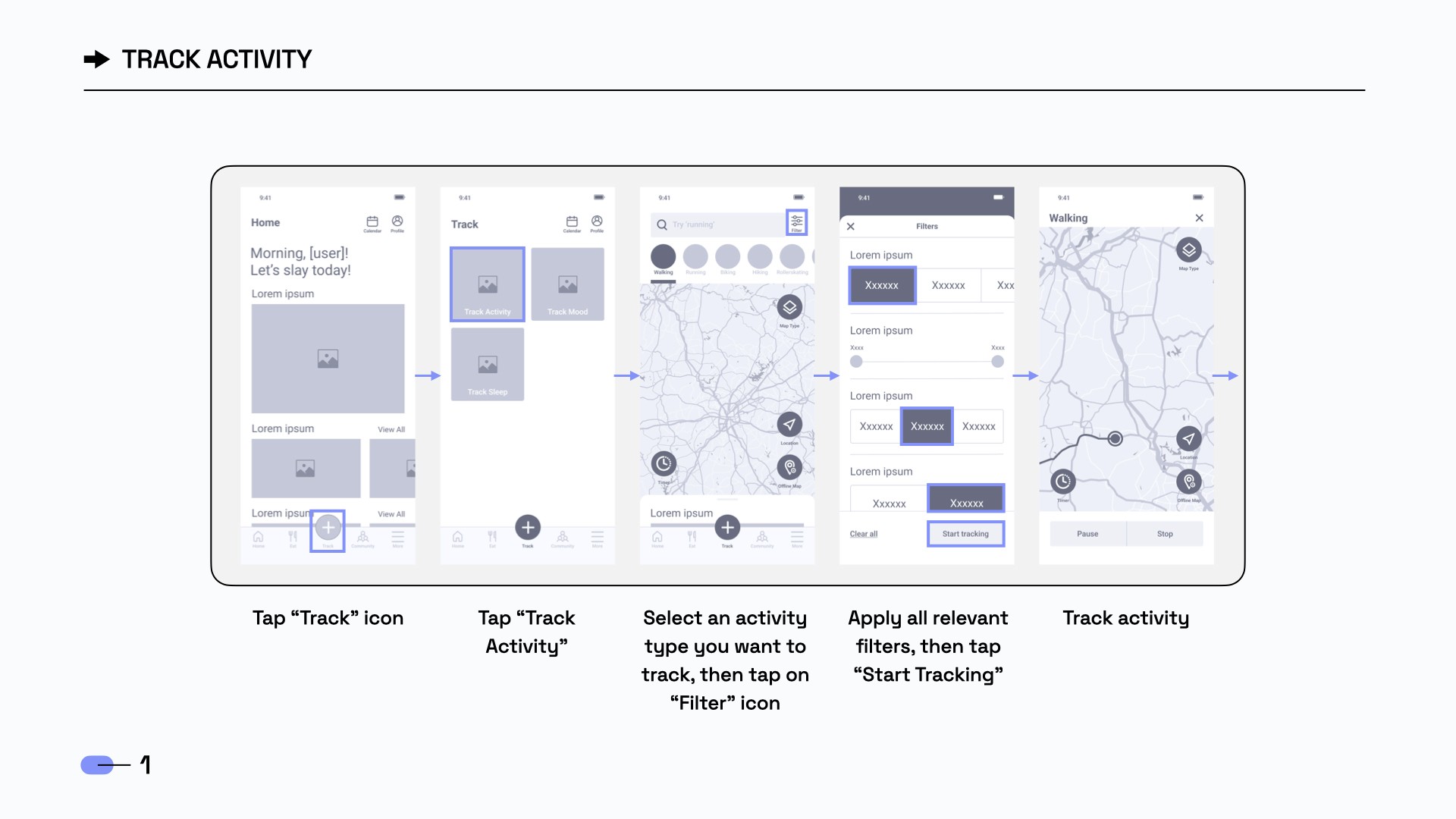
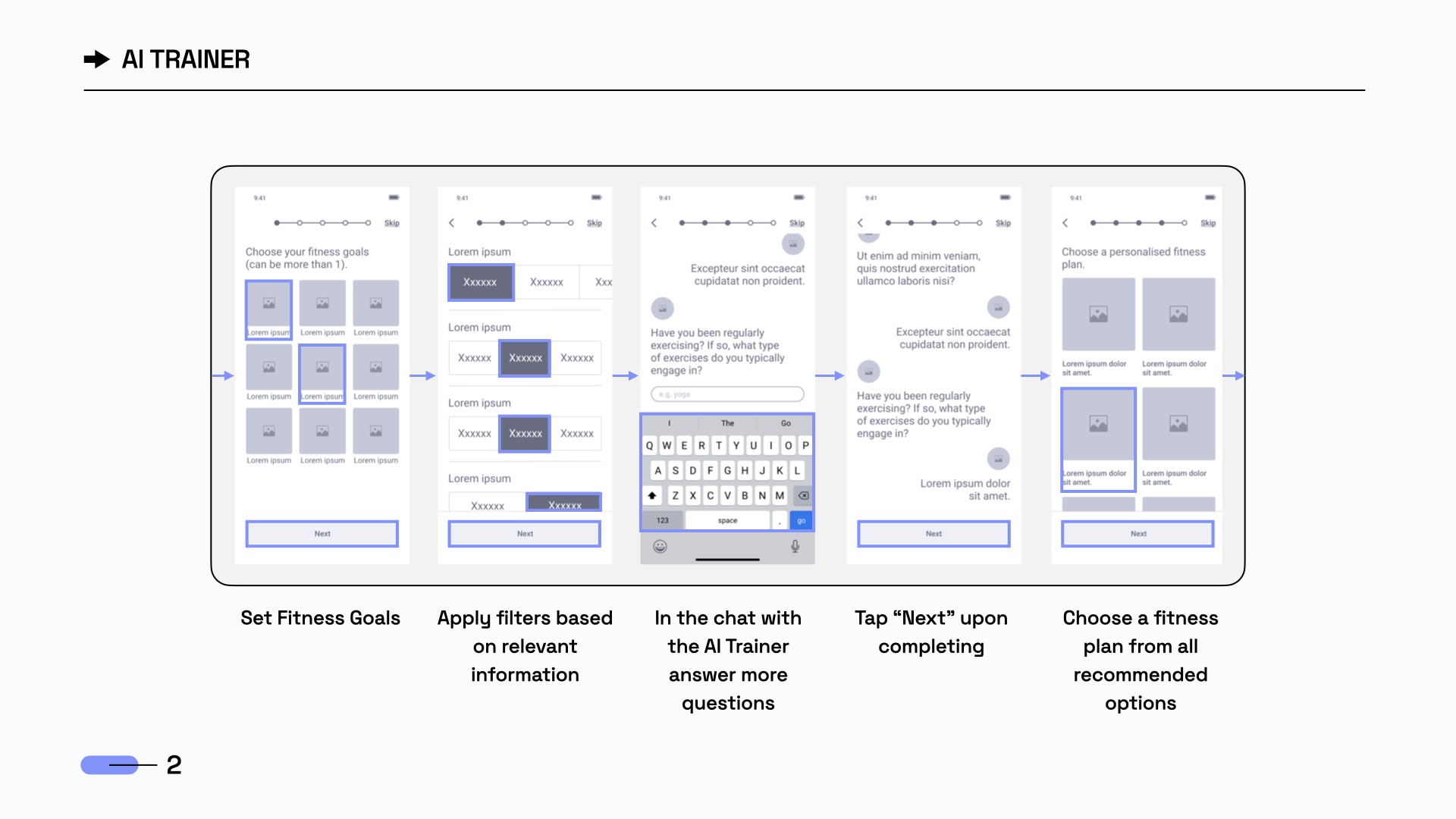
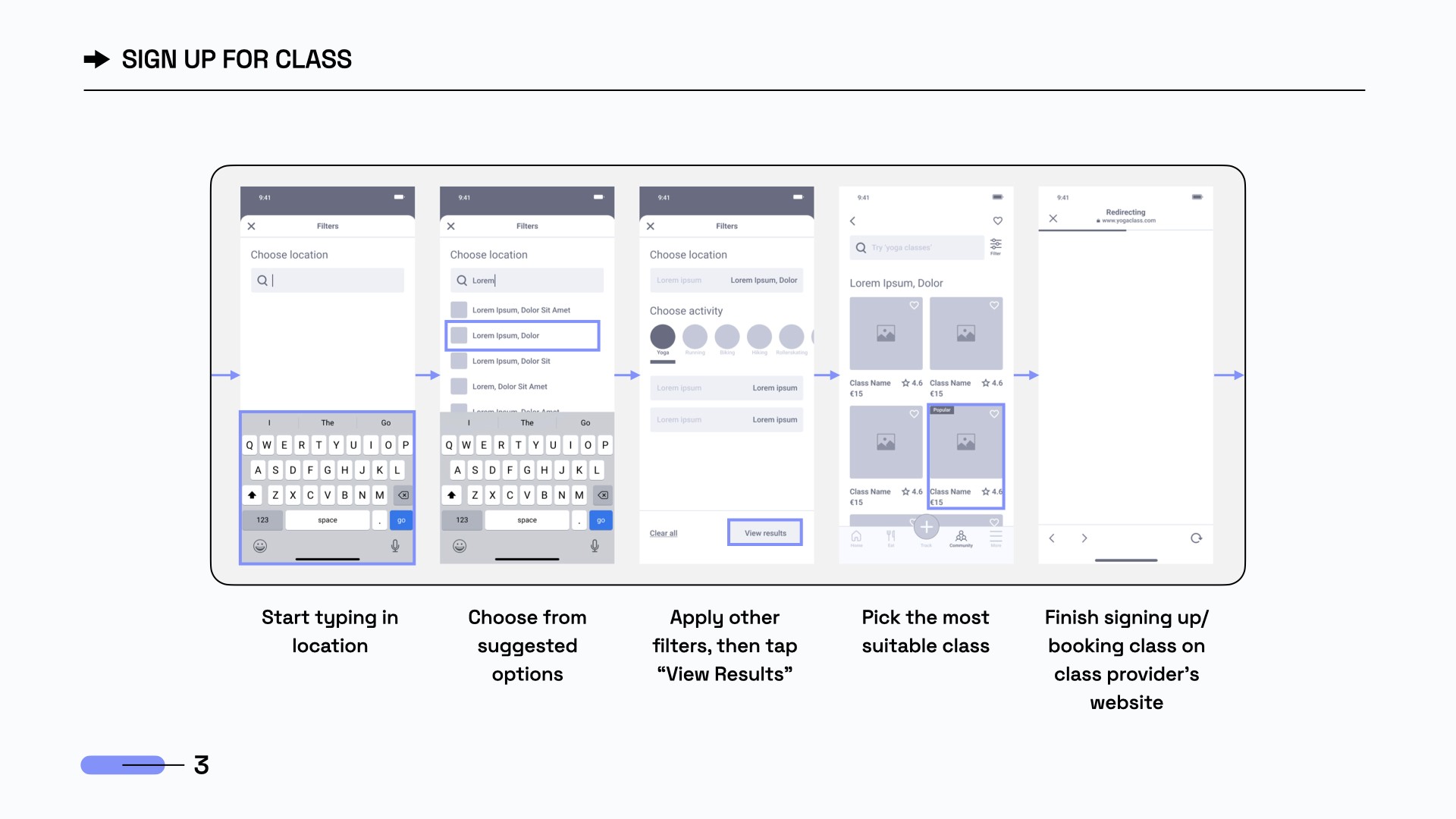
Lo-Finally!
After testing the sketches myself, I finally moved on to designing! Yay! My favorite part :)
The features were shaping up nicely in these lo-fi prototypes, creating a solid foundation for my first thorough user test.
Prototype & test
Prototype & test
Prototype & test
Lo-Finally!
After testing the sketches myself, I finally moved on to designing! Yay! My favorite part :)
The features were shaping up nicely in these lo-fi prototypes, creating a solid foundation for my first thorough user test.
Lo-Finally!
After testing the sketches myself, I finally moved on to designing! Yay! My favorite part :)
The features were shaping up nicely in these lo-fi prototypes, creating a solid foundation for my first thorough user test.
Te-Te-Testing
Te-Te-Testing
I ran in-person tests with 5 participants using the Figma app, capturing screen and facial reactions. Users wanted fully interactive screens and got frustrated when elements weren’t clickable. Using affinity mapping and a rainbow spreadsheet, I found key issues like: confusing AI Trainer features and unclear wording.
User testing showed that Olive wasn’t as intuitive or engaging as intended :( Its rich functionality often left users confused, highlighting the need for major improvements.
I ran in-person tests with 5 participants using the Figma app, capturing screen and facial reactions. Users wanted fully interactive screens and got frustrated when elements weren’t clickable. Using affinity mapping and a rainbow spreadsheet, I found key issues like: confusing AI Trainer features and unclear wording.
User testing showed that Olive wasn’t as intuitive or engaging as intended :( Its rich functionality often left users confused, highlighting the need for major improvements.
Design Metrics (KPI's)
Design Metrics (KPI's)
Task #1
Create an account
success rate metric: The task is successfully completed once the user has successfully created an account and reached the 'Home' screen.
Success rate: 100% (5 out of 5 users successfully completed the task)
Error Rate: 0 errors per task attempt
(0 errors / 5 task attempts)
AVERAGE TIME ON TASK: 1 min 59 sec
Task #1
Create an account
success rate metric: The task is successfully completed once the user has successfully created an account and reached the 'Home' screen.
Success rate: 100% (5 out of 5 users successfully completed the task)
Error Rate: 0 errors per task attempt (0 errors / 5 task attempts)
Task #1
Create an account
success rate metric: The task is successfully completed once the user has successfully created an account and reached the 'Home' screen.
Success rate: 100% (5 out of 5 users successfully completed the task)
Error Rate: 0 errors per task attempt
(0 errors / 5 task attempts)
AVERAGE TIME ON TASK: 1 min 59 sec
Task #2
Find a route using 'Filter' & track activity
success rate metric: The task is successfully completed once the user has successfully filtered out a route and started tracking their activity.
Success rate: 80% (4 out of 5 users successfully completed the task)
Error Rate: 0.6 errors per task attempt
(3 errors / 5 task attempts)
AVERAGE TIME ON TASK: 1 min 31 sec
Task #2
Find a route using 'Filter' & track activity
success rate metric: The task is successfully completed once the user has successfully filtered out a route and started tracking their activity.
Success rate: 80% (4 out of 5 users successfully completed the task)
Error Rate: 0.6 errors per task attempt (3 errors / 5 task attempts)
Task #2
Find a route using 'Filter' & track activity
success rate metric: The task is successfully completed once the user has successfully filtered out a route and started tracking their activity.
Success rate: 80% (4 out of 5 users successfully completed the task)
Error Rate: 0.6 errors per task attempt
(3 errors / 5 task attempts)
AVERAGE TIME ON TASK: 1 min 31 sec
Task #3
Find and sign up for a class
success rate metric: The task is successfully completed once the user has successfully found a class and completed the sign up process.
Success rate: 80% (4 out of 5 users successfully completed the task)
Error Rate: 0.4 errors per task attempt
(2 errors / 5 task attempts)
AVERAGE TIME ON TASK: 1 min 2 sec
Task #3
Find and sign up for a class
success rate metric: The task is successfully completed once the user has successfully found a class and completed the sign up process.
Success rate: 80% (4 out of 5 users successfully completed the task)
Error Rate: 0.4 errors per task attempt (2 errors / 5 task attempts)
Task #3
Find and sign up for a class
success rate metric: The task is successfully completed once the user has successfully found a class and completed the sign up process.
Success rate: 80% (4 out of 5 users successfully completed the task)
Error Rate: 0.4 errors per task attempt
(2 errors / 5 task attempts)
AVERAGE TIME ON TASK: 1 min 2 sec
Task #4
Start tracking activity
success rate metric: The task is successfully completed once the user has successfully opened the activity tracker, chosen the activity they'd like to track and have started the tracking.
Success rate: 40% (2 out of 5 users successfully completed the task)
Error Rate: 0.6 errors per task attempt (3 errors / 5 task attempts)
AVERAGE TIME ON TASK: 0 min 54 sec
Task #4
Start tracking activity
success rate metric: The task is successfully completed once the user has opened the activity tracker, chosen the activity they'd like to track and have started the tracking.
Success rate: 40% (2 out of 5 users successfully completed the task)
Error Rate: 0.6 errors per task attempt (3 errors / 5 task attempts)
AVERAGE TIME ON TASK: 0 min 54 sec
Task #4
Start tracking activity
success rate metric: The task is successfully completed once the user has successfully opened the activity tracker, chosen the activity they'd like to track and have started the tracking.
Success rate: 40% (2 out of 5 users successfully completed the task)
Error Rate: 0.6 errors per task attempt (3 errors / 5 task attempts)
AVERAGE TIME ON TASK: 0 min 54 sec
Task #5
Complete the health & fitness assessment
using AI Trainer
success rate metric: The task is successfully completed once the user has successfully completed the health & fitness assessment in the AI Trainer and have received a personalized fitness plan.
Success rate: 20% (1 out of 5 users successfully completed the task)
Error Rate: 0.2 errors per task attempt
(1 error / 5 task attempts)
AVERAGE TIME ON TASK: 3 min 13 sec
Task #5
Complete the health & fitness assessment using AI Trainer
success rate metric: The task is successfully completed once the user has successfully completed the health & fitness assessment in the AI Trainer and have received a personalized fitness plan.
Success rate: 20% (1 out of 5 users successfully completed the task)
Error Rate: 0.2 errors per task attempt (1 error / 5 task attempts)
Task #5
Complete the health & fitness assessment
using AI Trainer
success rate metric: The task is successfully completed once the user has successfully completed the health & fitness assessment in the AI Trainer and have received a personalized fitness plan.
Success rate: 20% (1 out of 5 users successfully completed the task)
Error Rate: 0.2 errors per task attempt
(1 error / 5 task attempts)
AVERAGE TIME ON TASK: 3 min 13 sec
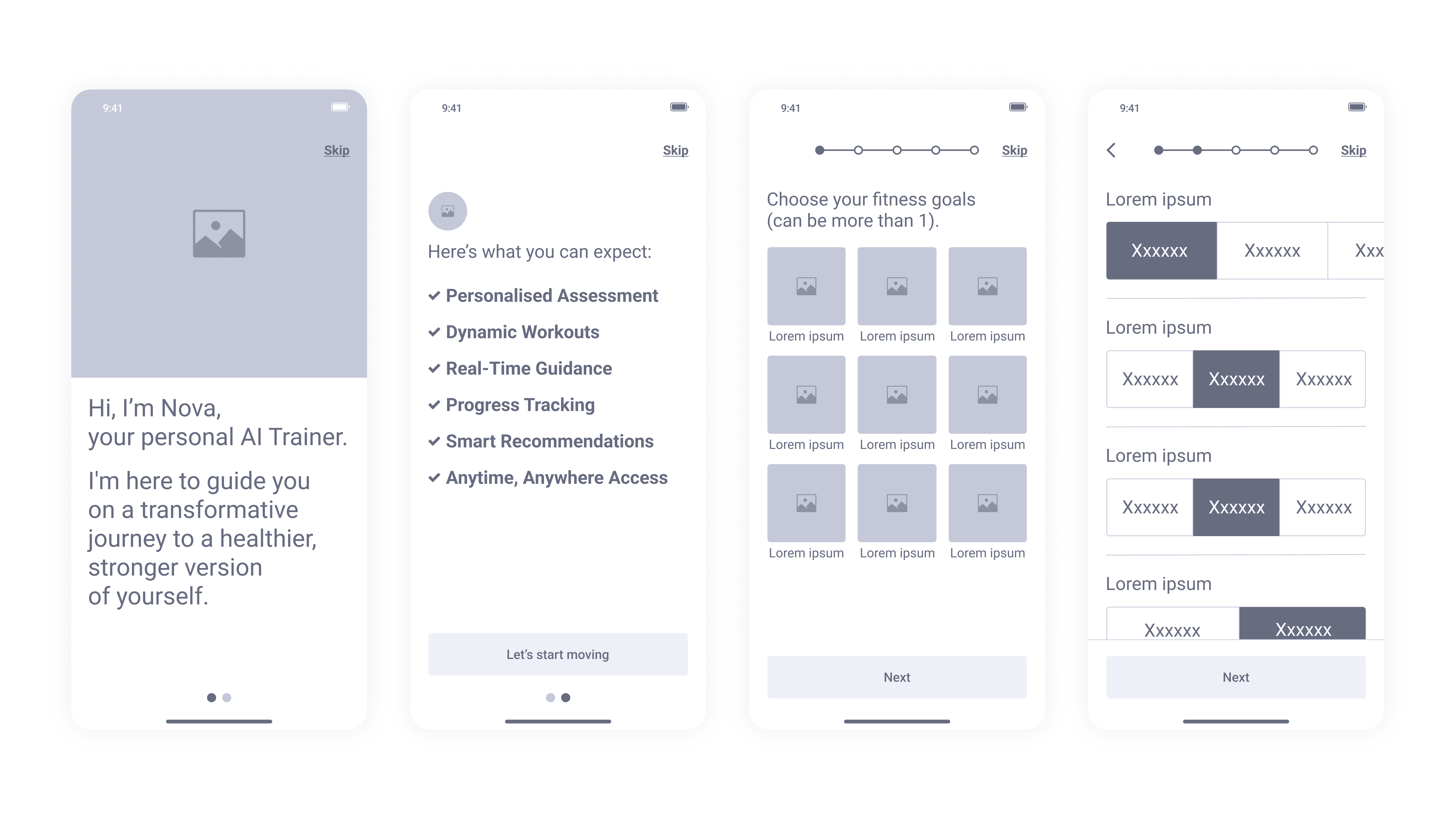
ISSUE #1
The functionality of the AI trainer feature
isn't clear.
SOLUTION
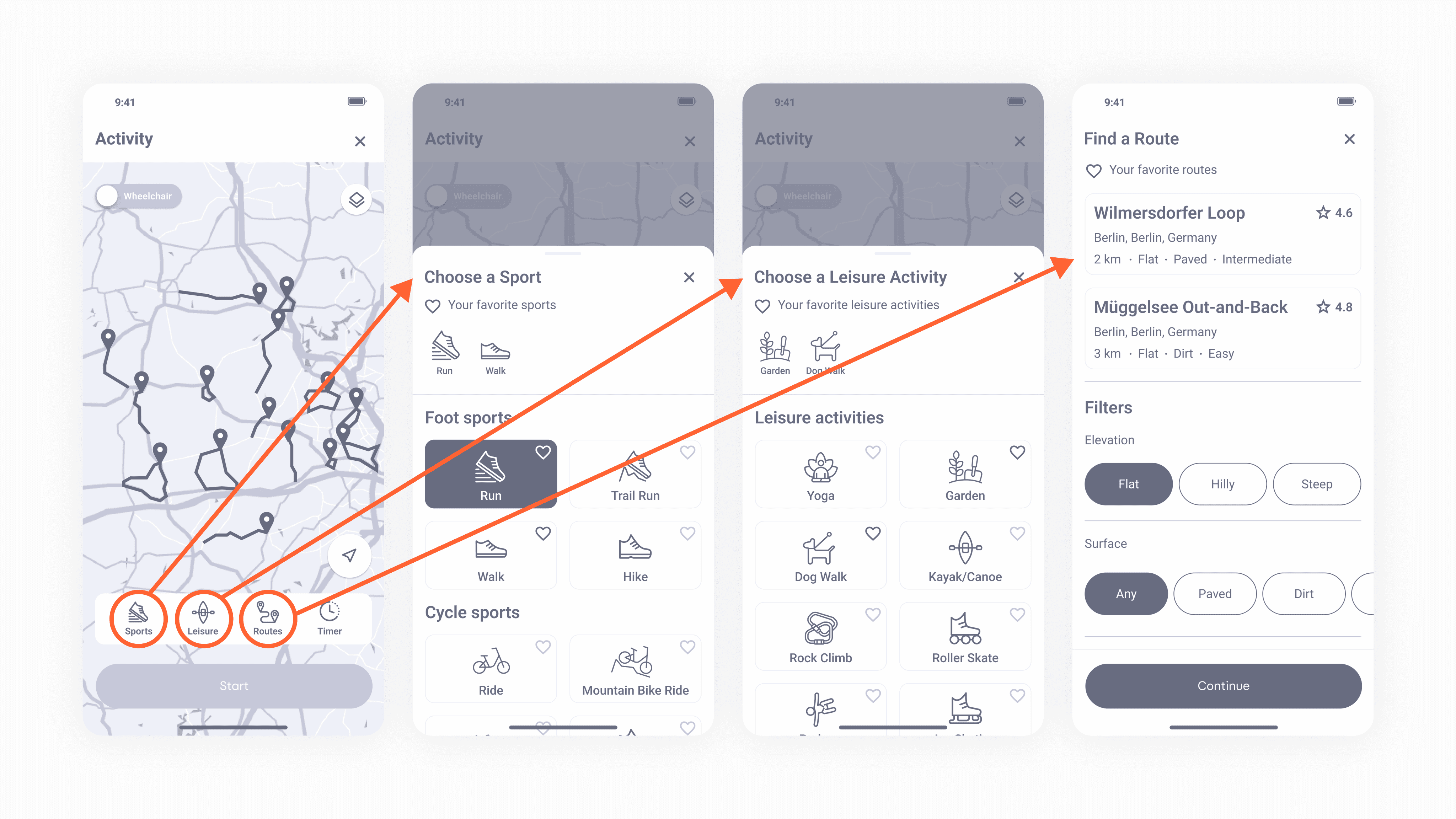
To improve usability, I removed the ‘Plus’ icon and placed key features directly in the navigation bar. Now users can tap ‘Activity’ to access the map instantly.
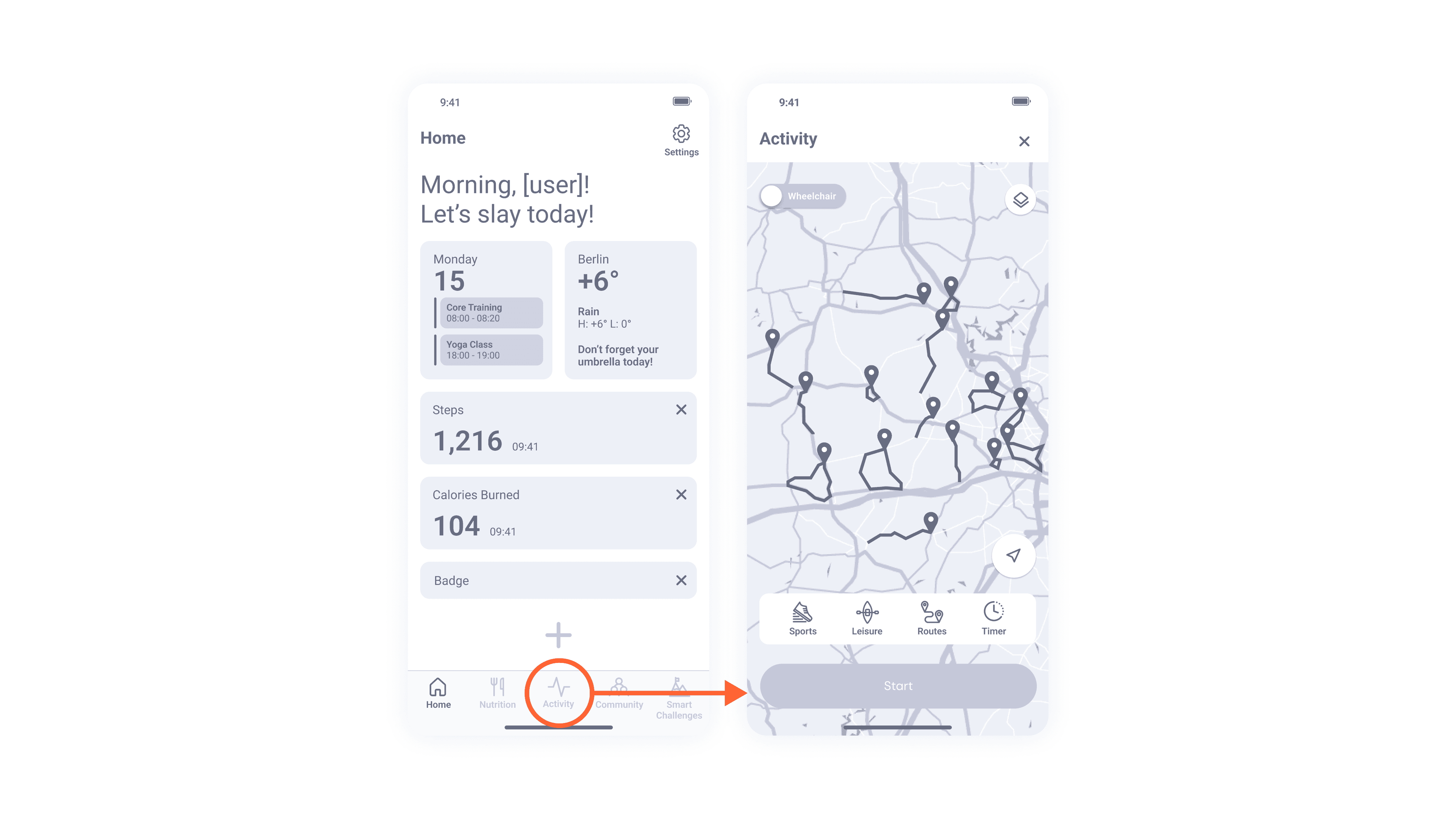
ISSUE #2
The activity tracking process is not straight-forward and requires too many steps.

Iterations
Iterations
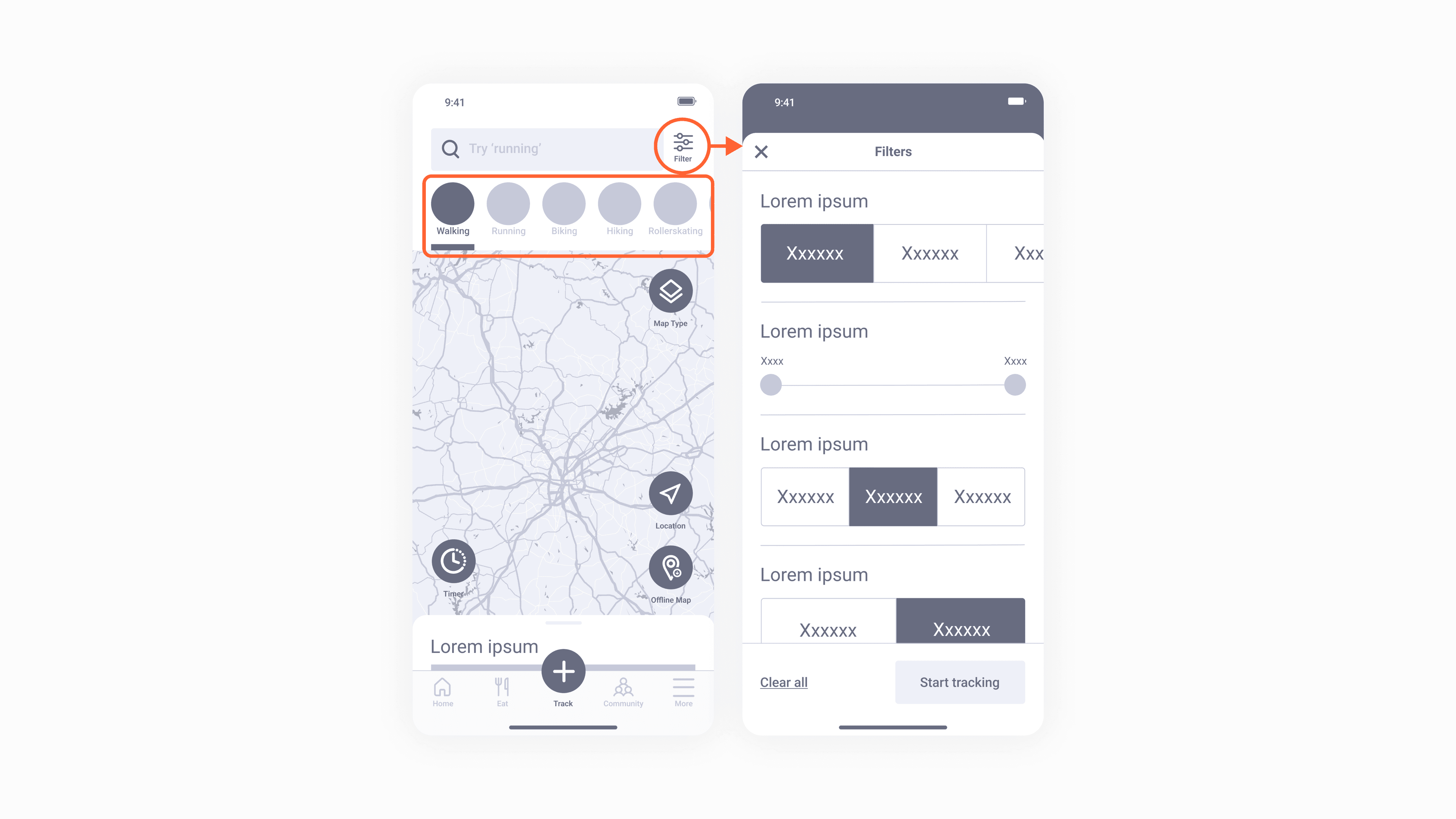
ISSUE #3
Users always looked past the scrollable activities menu on the screen.
ISSUE #1
The functionality of the AI trainer feature isn't clear.
ISSUE #1
The functionality of the AI trainer feature isn't clear.
SOLUTION
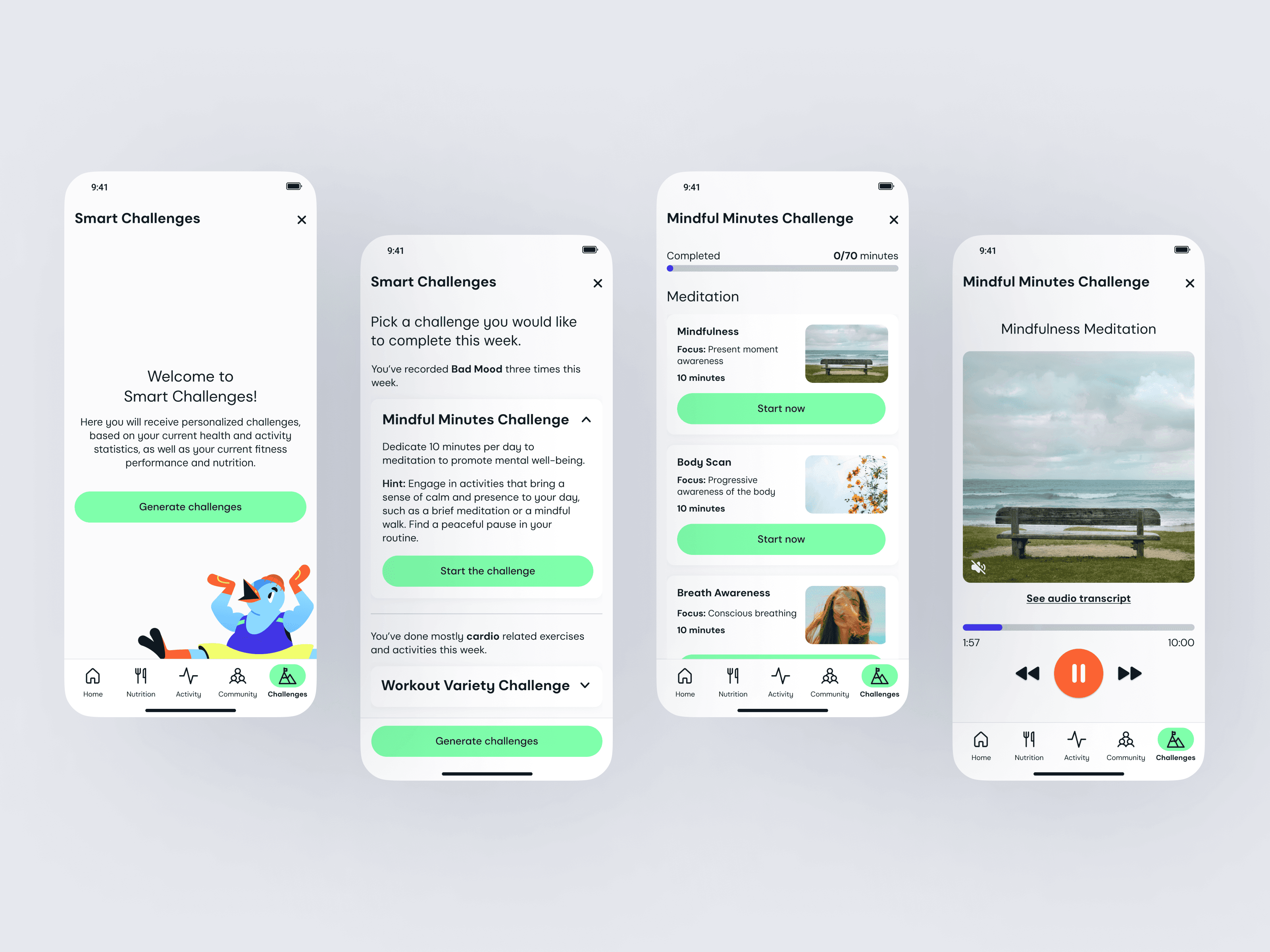
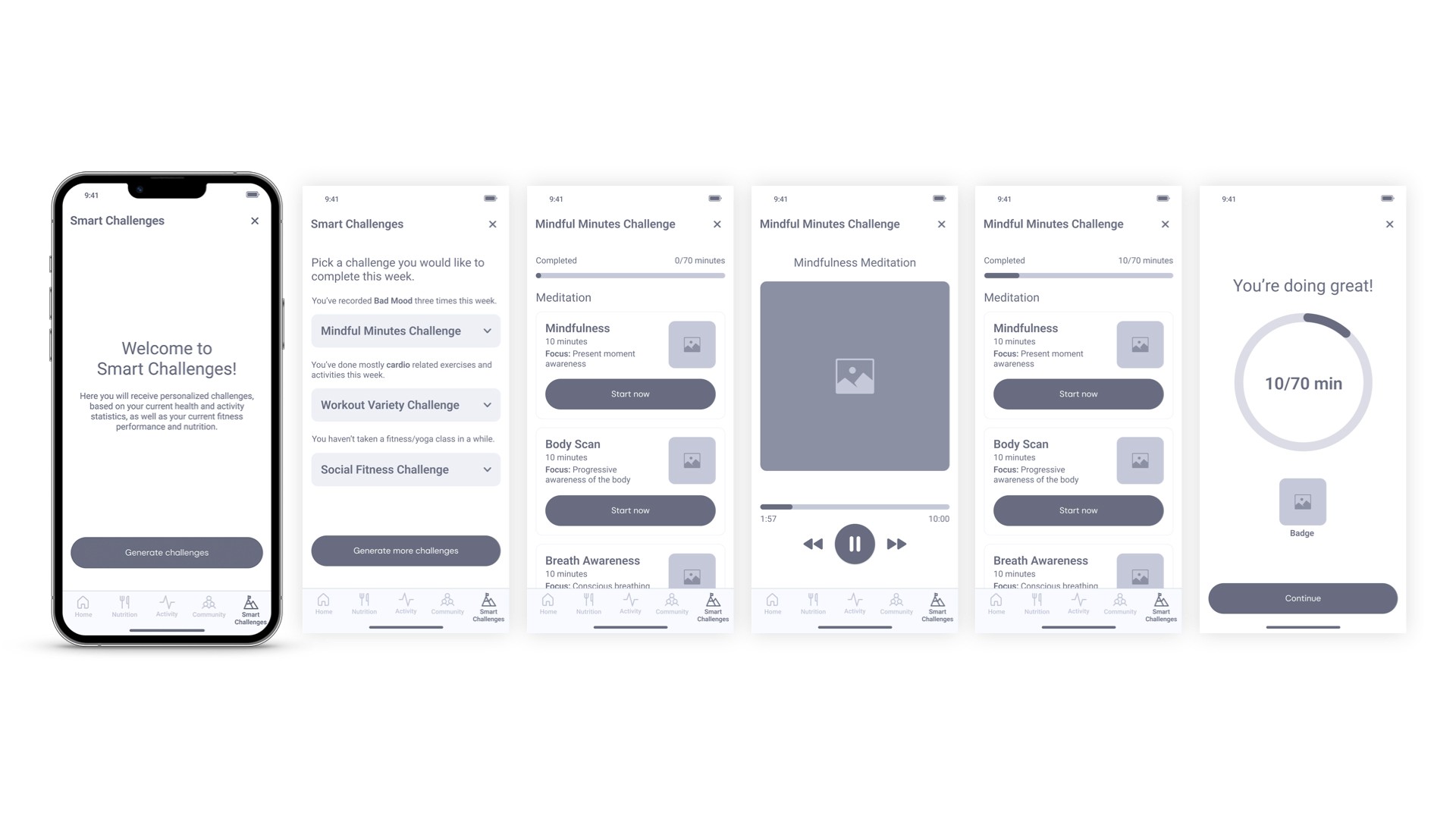
As a result, I replaced the AI Trainer with Smart Challenges, still AI-driven, but focused on personalized, goal-based tasks that better matched users’ health data and preferences.
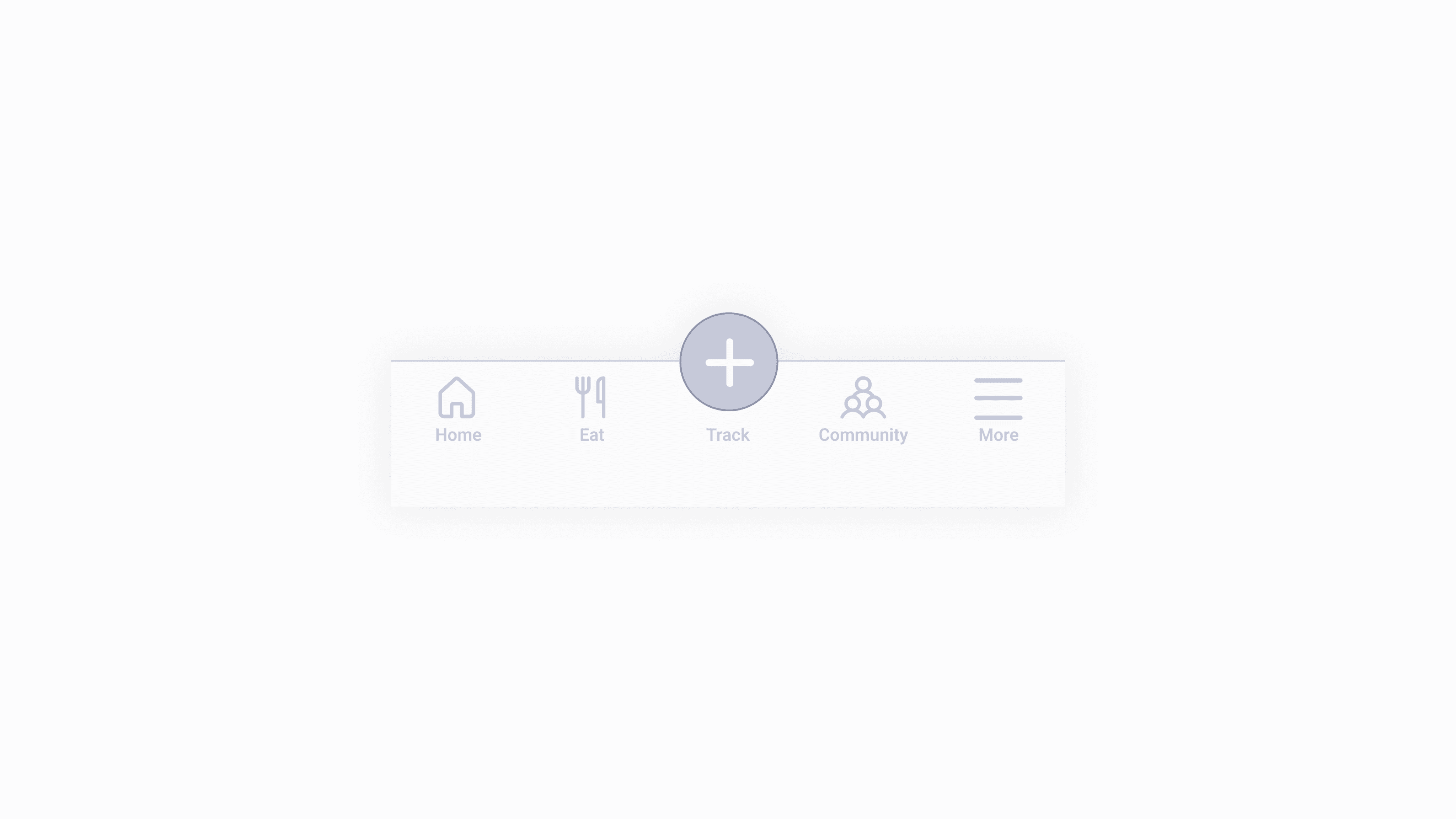
ISSUE #4
The icons in the bottom navigation are confusing and misleading.
ISSUE #5
‘Home’ screen is confusing, and lacks certain elements that the users would find useful
to have.
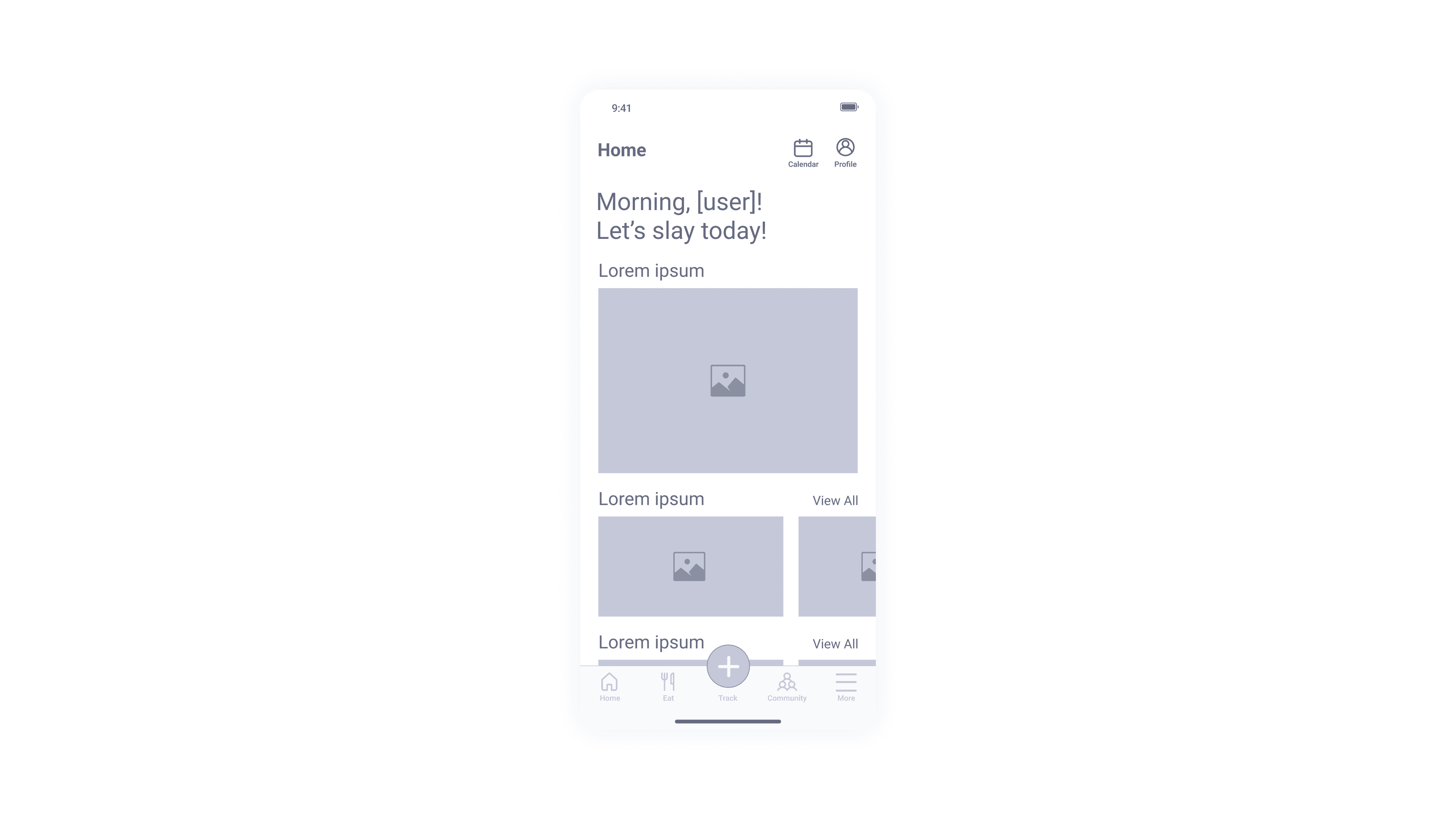
SOLUTION
I redesigned the ‘Home’ screen to be fully customisable. Now, it is possible for the users to add/delete elements based on their needs.
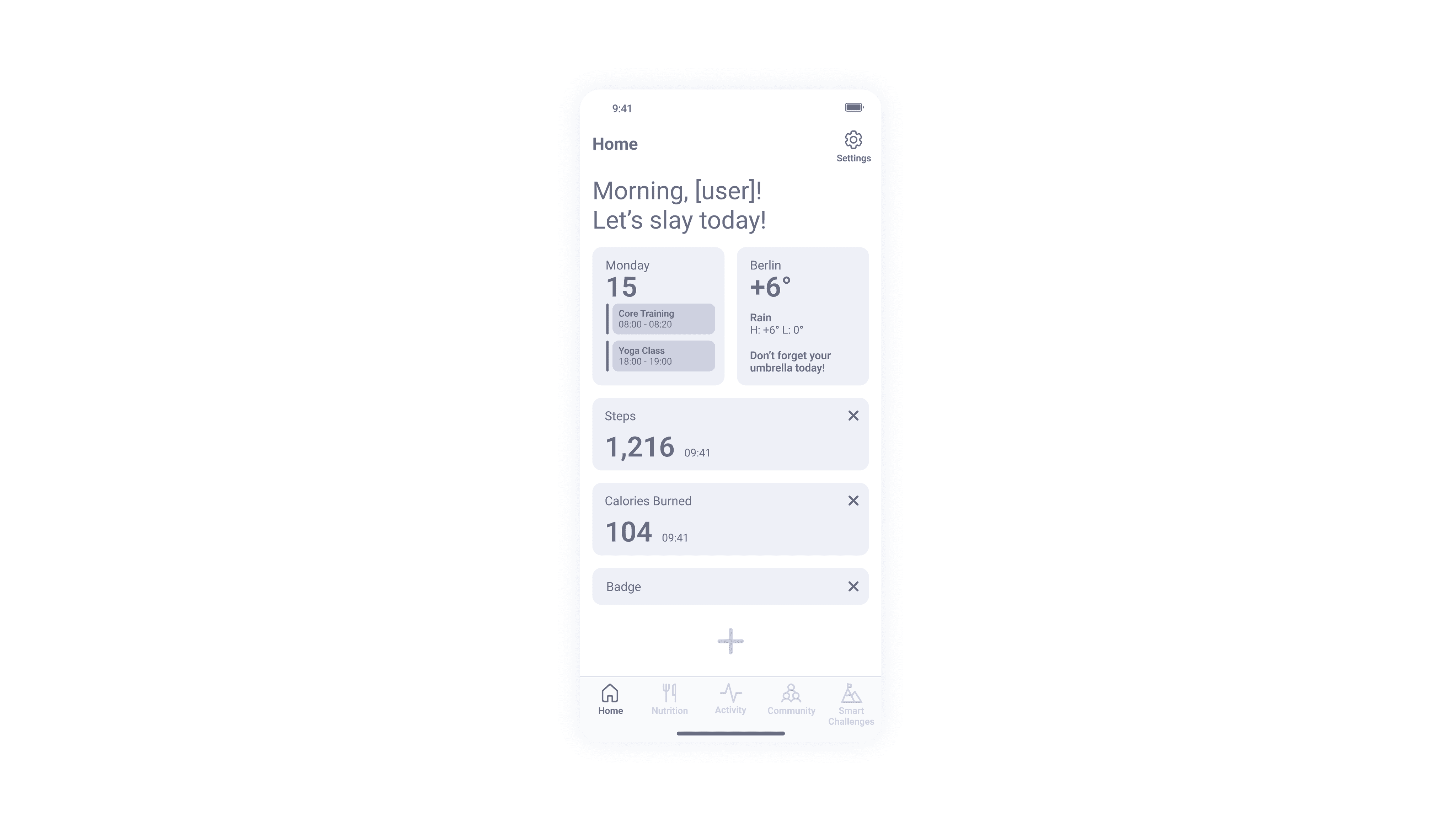
SOLUTION
I redesigned the icons and limited their functionality (i.e. got rid of ‘More’ to exclude of any hidden features).
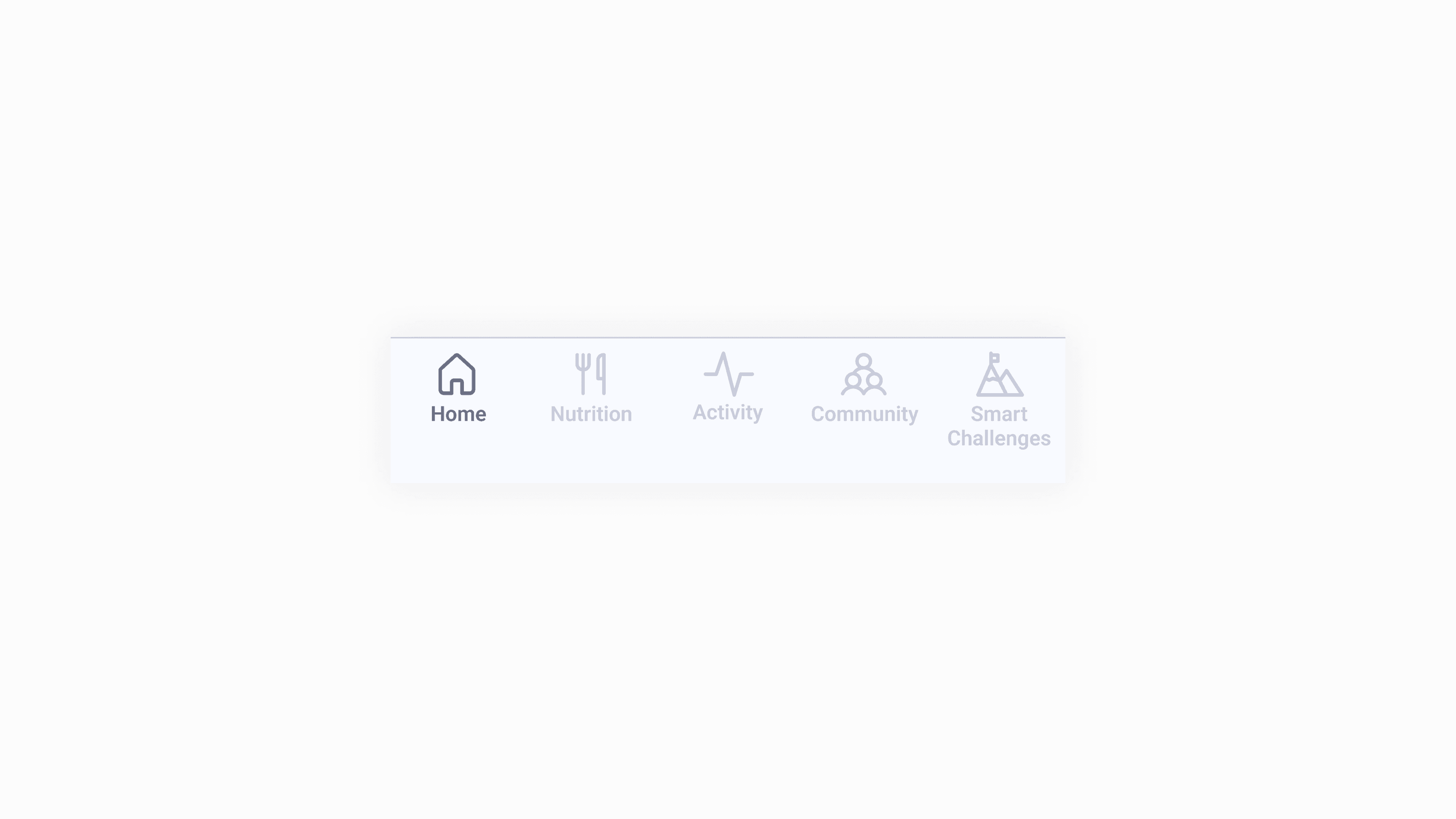
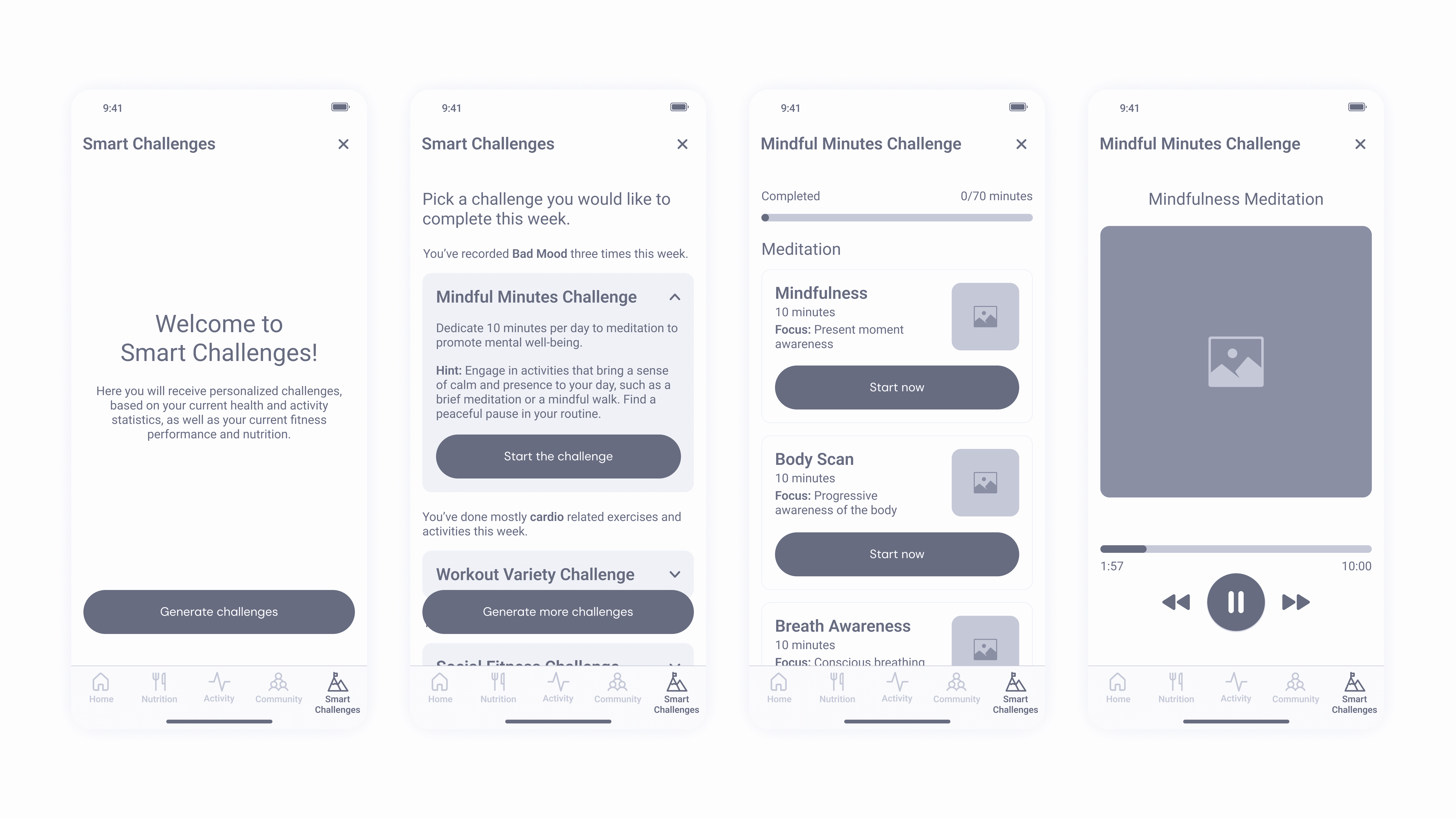
SOLUTION
As a result, I replaced the AI Trainer with Smart Challenges, still AI-driven, but focused on personalized, goal-based tasks that better matched users’ health data and preferences.
SOLUTION
As a result, I replaced the AI Trainer with Smart Challenges, still AI-driven, but focused on personalized, goal-based tasks that better matched users’ health data and preferences.
ISSUE #2
The activity tracking process is not straight-forward and requires too many steps.
SOLUTION
To improve usability, I removed the ‘Plus’ icon and placed key features directly in the navigation bar. Now users can tap ‘Activity’ to access the map instantly.
ISSUE #2
The activity tracking process is not straight-forward and requires too many steps.
SOLUTION
Users wanted filters to be visible to avoid scrolling through all options, so I redesigned them accordingly.
Task #1
Create an account
success rate metric: The task is successfully completed once the user has successfully created an account and reached the 'Home' screen.
Success rate: 100% (5 out of 5 users successfully completed the task)
Error Rate: 0 errors per task attempt
(0 errors / 5 task attempts)
AVERAGE TIME ON TASK: 1 min 58 sec
Task #2
Find a route using 'Filter' & track activity
success rate metric: The task is successfully completed once the user has successfully filtered out a route and started tracking their activity.
Success rate: 100% (5 out of 5 users successfully completed the task)
Error Rate: 0 errors per task attempt
(0 errors / 5 task attempts)
AVERAGE TIME ON TASK: 1 min 4 sec
Task #3
Find and sign up for a class
success rate metric: The task is successfully completed once the user has successfully found a class and completed the sign up process.
Success rate: 100% (5 out of 5 users successfully completed the task)
Error Rate: 0.2 errors per task attempt
(1 error / 5 task attempts)
AVERAGE TIME ON TASK: 1 min 11 sec
Task #4
Start tracking activity
success rate metric: The task is successfully completed once the user has successfully opened the activity tracker, chosen the activity they'd like to track and have started the tracking.
Success rate: 80% (4 out of 5 users successfully completed the task)
Error Rate: 0.2 errors per task attempt
(1 error / 5 task attempts)
AVERAGE TIME ON TASK: 0 min 18 sec
Task #5
(Testing new feature 'Smart Challenges')
Generate smart challenges and choose one to complete and receive a badge
success rate metric: The task is successfully completed once the user has successfully generated smart challenges, completed one of them and received a completion badge.
Success rate: 100% (5 out of 5 users successfully completed the task)
Error Rate: 0 errors per task attempt
(0 errors / 5 task attempts)
AVERAGE TIME ON TASK: 1 min 2 sec
SOLUTION
To improve usability, I removed the ‘Plus’ icon and placed key features directly in the navigation bar. Now users can tap ‘Activity’ to access the map instantly.
ISSUE #3
Users always looked past the scrollable activities menu on the screen.
SOLUTION
Users wanted filters to be visible to avoid scrolling through all options, so I redesigned them accordingly.
ISSUE #3
Users always looked past the scrollable activities menu on the screen.
SOLUTION
Users wanted filters to be visible to avoid scrolling through all options, so I redesigned them accordingly.
ISSUE #4
The icons in the bottom navigation are confusing
and misleading.
ISSUE #4
The icons in the bottom navigation are confusing
and misleading.
SOLUTION
I redesigned the icons and limited their functionality (i.e. got rid of ‘More’ to exclude of any hidden features).
SOLUTION
I redesigned the icons and limited their functionality (i.e. got rid of ‘More’ to exclude of any hidden features).
ISSUE #5
‘Home’ screen is confusing, and lacks certain elements that the users would find useful to have.
SOLUTION
I redesigned the ‘Home’ screen to be fully customisable. Now, it is possible for the users to add/delete elements based on their needs.
SOLUTION
I redesigned the ‘Home’ screen to be fully customisable. Now, it is possible for the users to add/delete elements based on their needs.
Mid-Fi Prototype
Mid-Fi Prototype
After all necessary iterations have been noted and completed, I finished the mid-fidelity prototypes. Olive was ready for another usability test to see if the new design worked better.
After all necessary iterations have been noted and completed, I finished the mid-fidelity prototypes. Olive was ready for another usability test to see if the new design worked better.
Aaaand the results are in!
Aaand the results are in!
Aaaand the results are in!
Task #1
Create an account
success rate metric: The task is successfully completed once the user has successfully created an account and reached the 'Home' screen.
Success rate: 100% (5 out of 5 users successfully completed the task)
Error Rate: 0 errors per task attempt
(0 errors / 5 task attempts)
AVERAGE TIME ON TASK: 1 min 58 sec
Task #1
Create an account
success rate metric: The task is successfully completed once the user has successfully created an account and reached the 'Home' screen.
Success rate: 100% (5 / 5 users successfully completed the task)
Error Rate: 0 errors per task attempt
(0 errors / 5 task attempts)
AVERAGE TIME ON TASK: 1 min 58sec
Task #2
Find a route using 'Filter' & track activity
success rate metric: The task is successfully completed once the user has successfully filtered out a route and started tracking their activity.
Success rate: 100% (5 out of 5 users successfully completed the task)
Error Rate: 0 errors per task attempt
(0 errors / 5 task attempts)
AVERAGE TIME ON TASK: 1 min 4 sec
Task #2
Find a route using 'Filter' & track activity
success rate metric: The task is successfully completed once the user has successfully filtered out a route and started tracking their activity.
Success rate: 100% (5 / 5 users successfully completed the task)
Error Rate: 0 errors per task attempt
(0 errors / 5 task attempts)
AVERAGE TIME ON TASK: 1 min 4 sec
Task #3
Find and sign up for a class
success rate metric: The task is successfully completed once the user has found a class and completed the sign up process.
Success rate: 100% (5 out of 5 users successfully completed the task)
Error Rate: 0.2 errors per task attempt
(1 error / 5 task attempts)
AVERAGE TIME ON TASK: 1 min 11 sec
Task #3
Find and sign up for a class
success rate metric: The task is successfully completed once the user has successfully found a class and completed the sign up process.
Success rate: 100% (5 / 5 users successfully completed the task)
Error Rate: 0.2 errors per task attempt
(1 error / 5 task attempts)
AVERAGE TIME ON TASK: 1 min 11 sec
Task #4
Start tracking activity
success rate metric: The task is successfully completed once the user has successfully opened the activity tracker, chosen the activity they'd like to track and have started the tracking.
Success rate: 80% (4 out of 5 users successfully completed the task)
Error Rate: 0.2 errors per task attempt
(1 error / 5 task attempts)
AVERAGE TIME ON TASK: 0 min 18 sec
Task #4
Start tracking activity
success rate metric: The task is successfully completed once the user has successfully opened the activity tracker, chosen the activity they'd like to track and have started the tracking.
Success rate: 80% (4 / 5 users successfully completed the task)
Error Rate: 0.2 errors per task attempt
(1 error / 5 task attempts)
AVERAGE TIME ON TASK: 0min 18sec
Task #5
(Testing new feature 'Smart Challenges')
Generate smart challenges and choose one to complete and receive a badge
success rate metric: The task is successfully completed once the user has generated smart challenges, completed one of them and received a badge.
Success rate: 100% (5 out of 5 users successfully completed the task)
Error Rate: 0 errors per task attempt
(0 errors / 5 task attempts)
AVERAGE TIME ON TASK: 1 min 2 sec
Task #5
(Testing new feature 'Smart Challenges')
Generate smart challenges and choose one to complete and receive a badge
success rate metric: The task is successfully completed once the user has successfully generated smart challenges, completed one of them and received a completion badge.
Success rate: 100% (5 / 5 users successfully completed the task)
Error Rate: 0 errors per task attempt
(0 errors / 5 task attempts)
AVERAGE TIME ON TASK: 1 min 2 sec
Refining
Refining
The Visual Identity
The Visual Identity
Before moving on to Hi-Fi designs, I needed to come up with a visual identity for Olive.
As a graphic designer with over 12 years of experience, designing the user interface for Olive has been a lot of fun for me. I love seeing color, typography, graphic elements and imagery come together to form a visual experience. I envisioned Olive to be vibrant and playful, yet minimalistic and not overly stimulating (as per user feedback).
As a result, Olive's visual identity is both dynamic and memorable, seamlessly complementing its functionality while ensuring zero distractions for users (as per user feedback).
Before moving on to Hi-Fi designs, I needed to come up with a visual identity for Olive.
As a graphic designer with over 12 years of experience, designing the user interface for Olive has been a lot of fun for me. I love seeing color, typography, graphic elements and imagery come together to form a visual experience. I envisioned Olive to be vibrant and playful, yet minimalistic and not overly stimulating (as per user feedback).
As a result, Olive's visual identity is both dynamic and memorable, seamlessly complementing its functionality while ensuring zero distractions for users (as per user feedback).
Color
Color
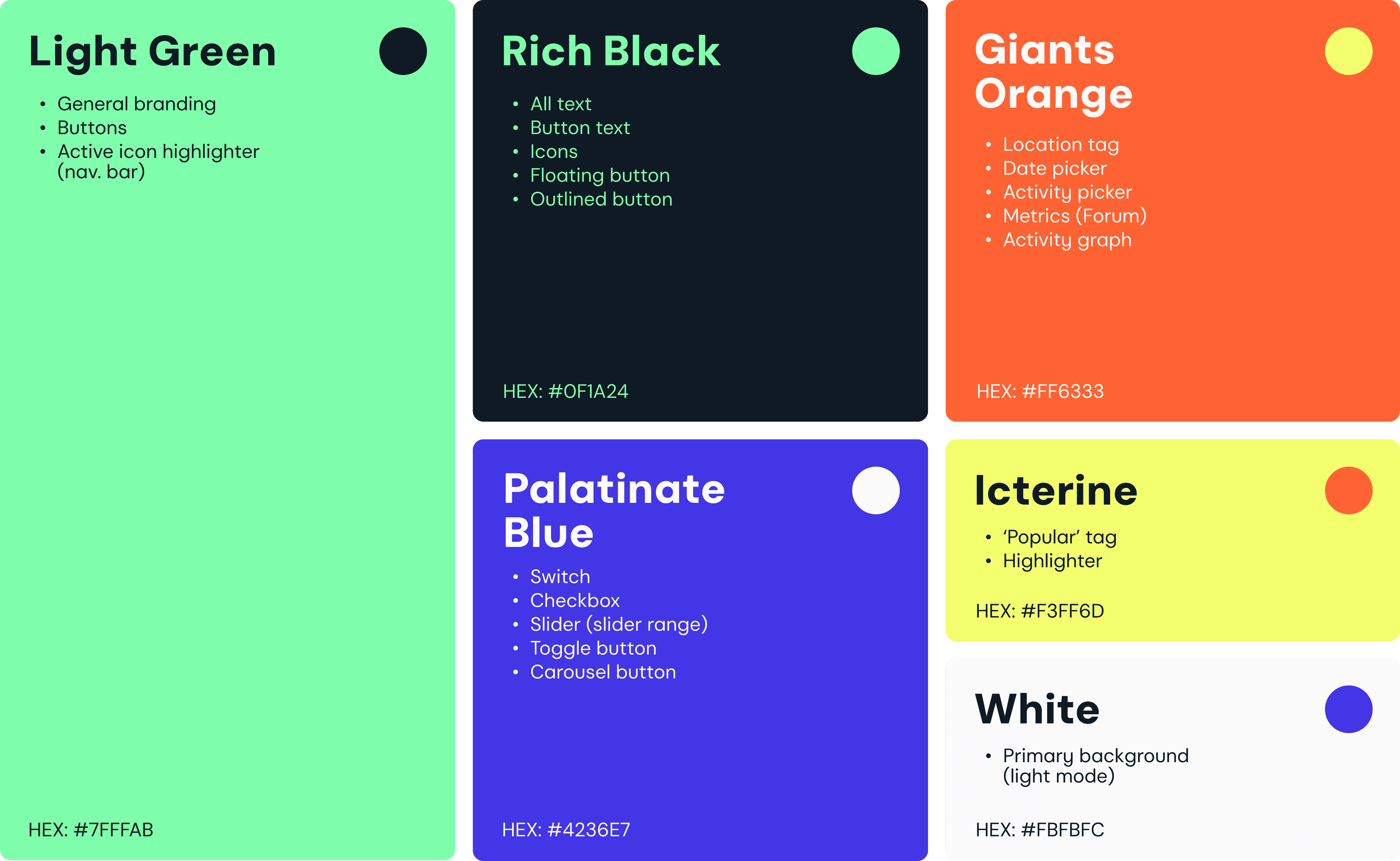
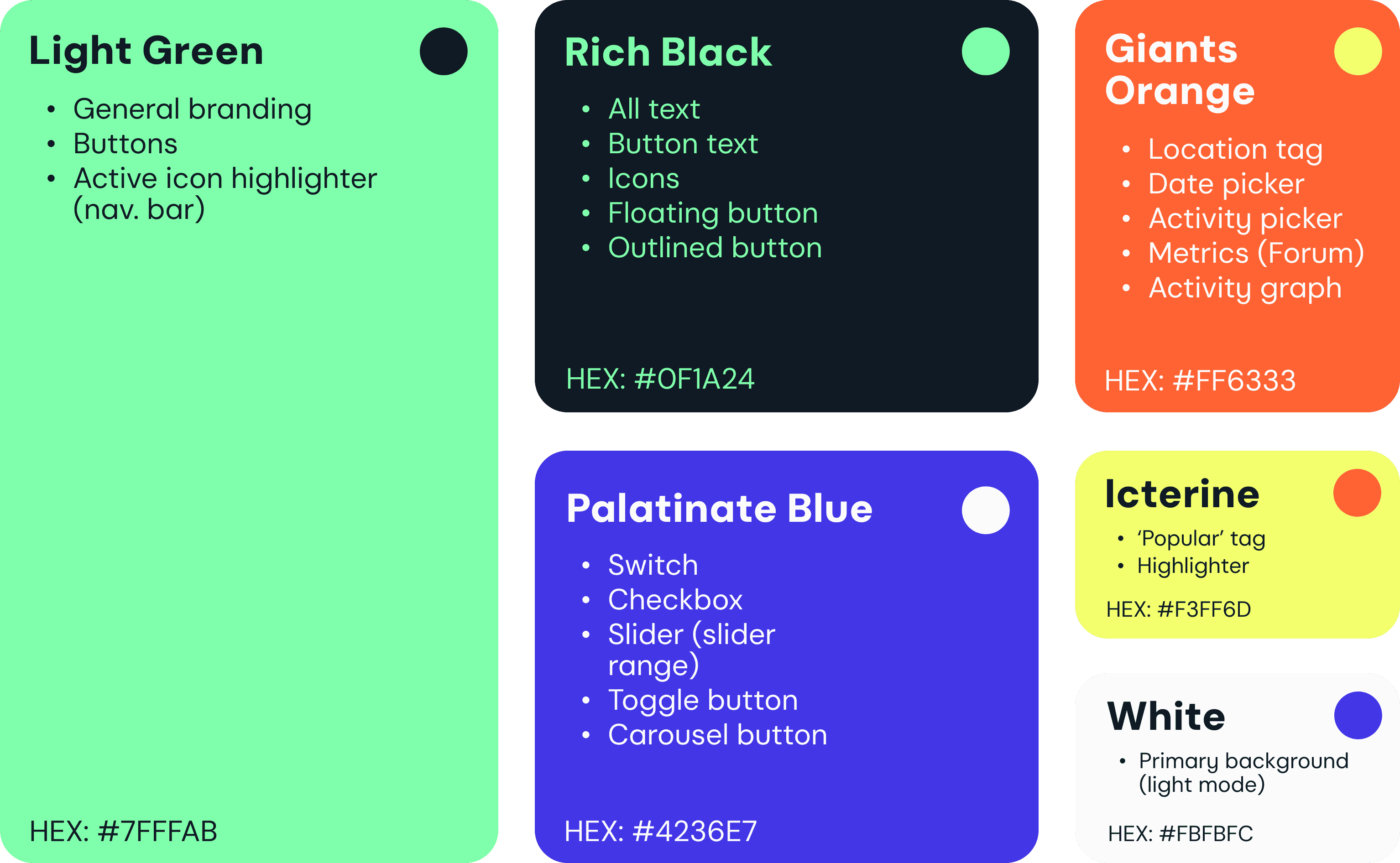
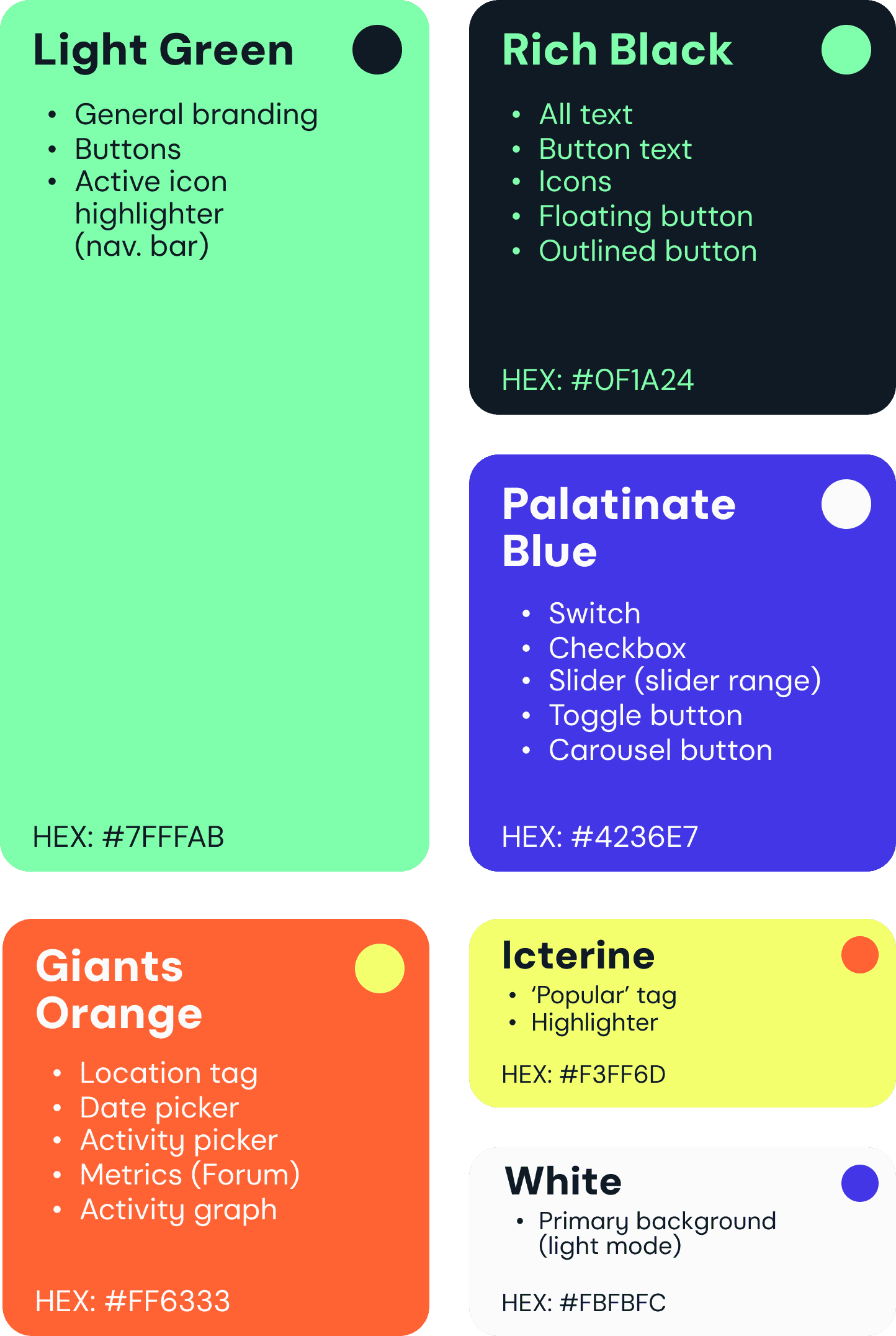
Extra juicy, fun, fresh.
The bright colors are selected to spark motivation and energize, ensuring a fun and exciting user experience.
Extra juicy, fun, fresh.
The bright colors are selected to spark motivation and energize, ensuring a fun and exciting user experience.
Extra juicy, fun, fresh.
The bright colors are selected to spark motivation and energize, ensuring a fun and exciting user experience.
Typography
Typography
Clean, crisp, sexy, geometric.
DM Sans perfectly complements the aesthetic of an app like Olive. The typeface is highly legible, even in small font sizes, while looking impressive as big, bold titles.
Clean, crisp, sexy, geometric.
DM Sans perfectly complements the aesthetic of an app like Olive. The typeface is highly legible, even in small font sizes, while looking impressive as big,
bold titles.
DM Sans exudes a sleek, modern vibe, elevating the user experience with its sexy, geometric, and ultra-clean aesthetic, effortlessly balancing sophistication and readability across all facets of the app interface.
Clean, crisp, sexy, geometric.
DM Sans perfectly complements the aesthetic of an app like Olive. The typeface is highly legible, even in small font sizes, while looking impressive as big, bold titles.
DM Sans
DM Sans
DM Sans
Logo
Logo
I went the obvious route with the logo, portraying a top view of a stuffed olive with its filling peeking through.
I went the obvious route with the logo, portraying a top view of a stuffed olive with its filling sneakily peeking through.
I went the obvious route with the logo, portraying a top view of a stuffed olive with its filling peeking through.
Imagery, Illustrations, Iconography,
UI Elements
Imagery, Illustrations, Iconography, UI Elements
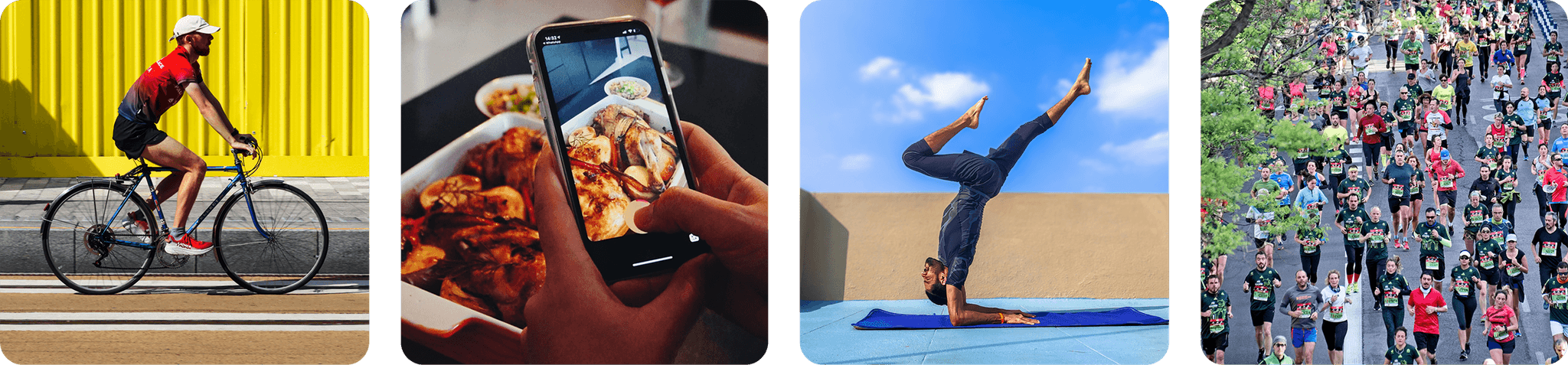
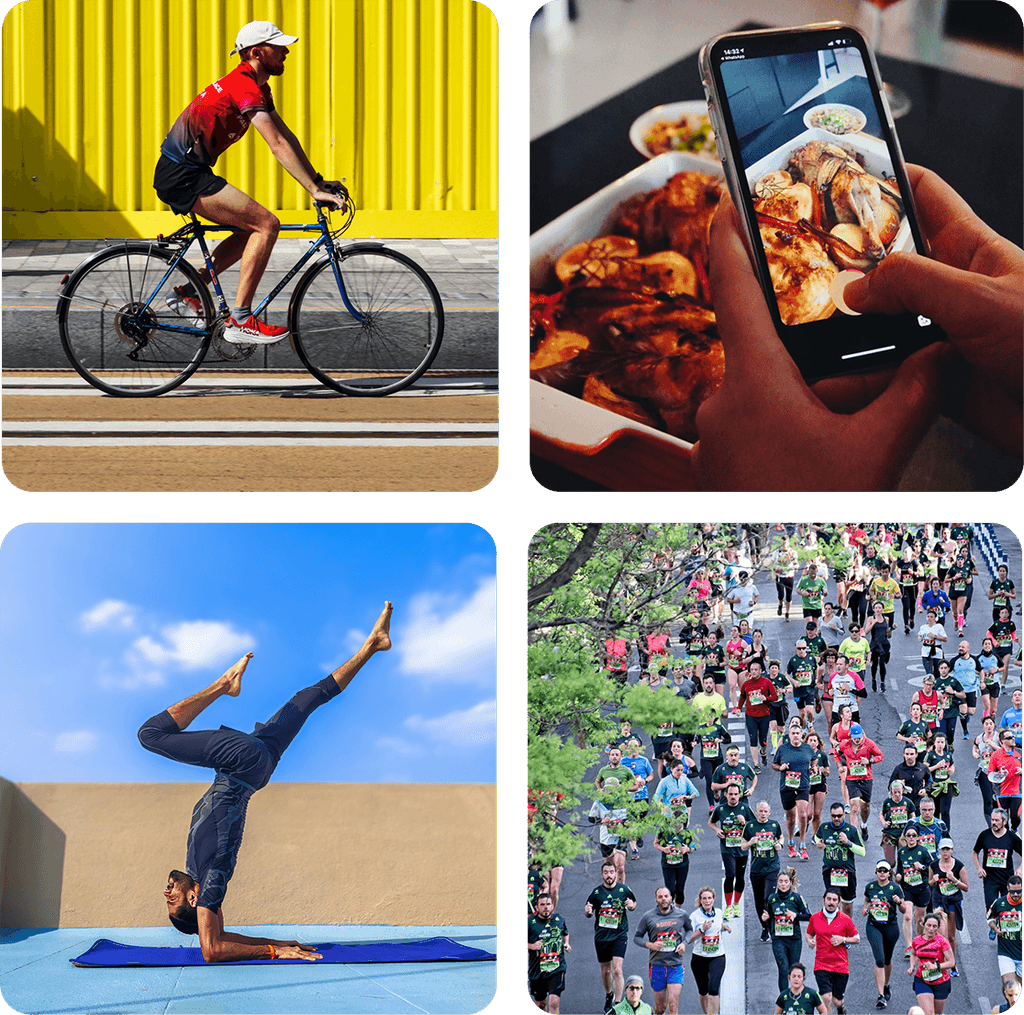
Lively, natural photography.
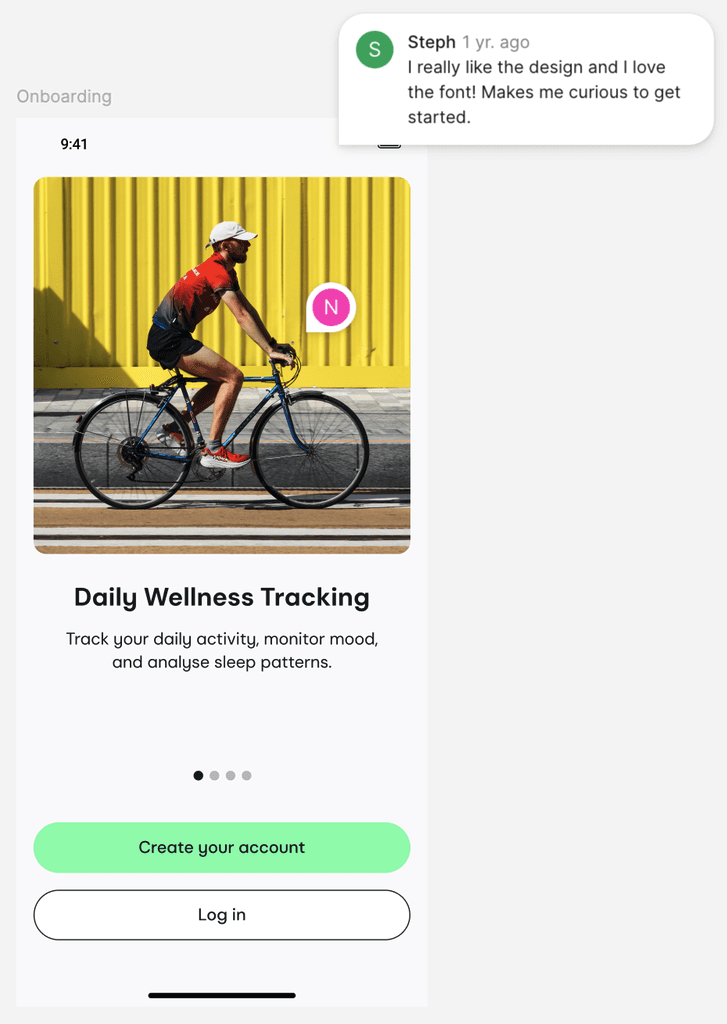
Olive uses only the “in-the-moment” photography, aiming for a natural feel rather than an artificial one.
Lively, natural photography.
Olive uses only the “in-the-moment” photography, aiming for a natural feel rather than an artificial one.
Lively, natural photography.
Olive uses only the “in-the-moment” photography, aiming for a natural feel rather than an artificial one.
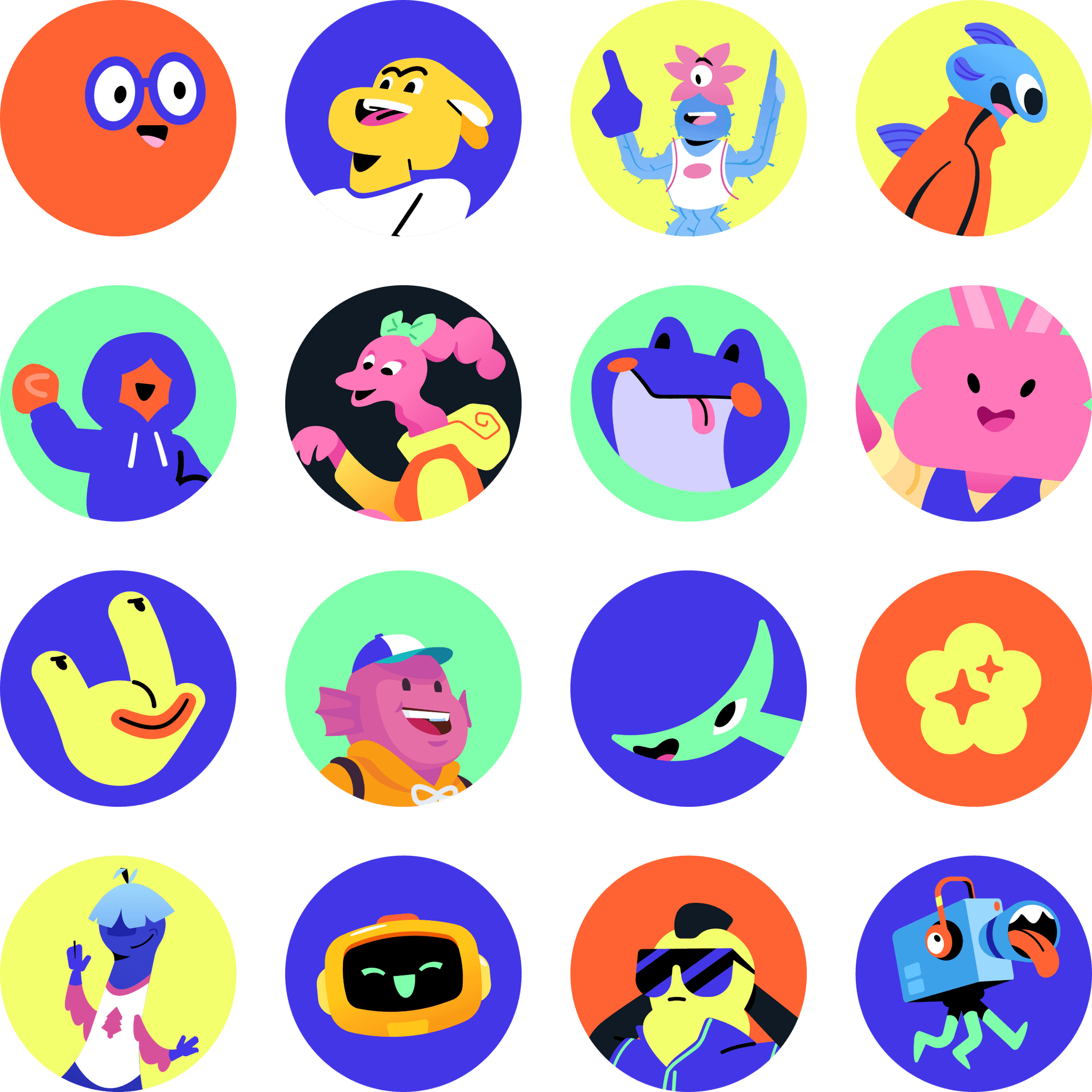
Quirky characters.
Funky characters add a bit of fun. These were borrowed from Discord as an inspiration for the style of illustrations I’d want to see in Olive.
Quirky characters.
Funky characters add a bit of fun. These were borrowed from Discord as an inspiration for the style of illustrations I’d want to see in Olive.
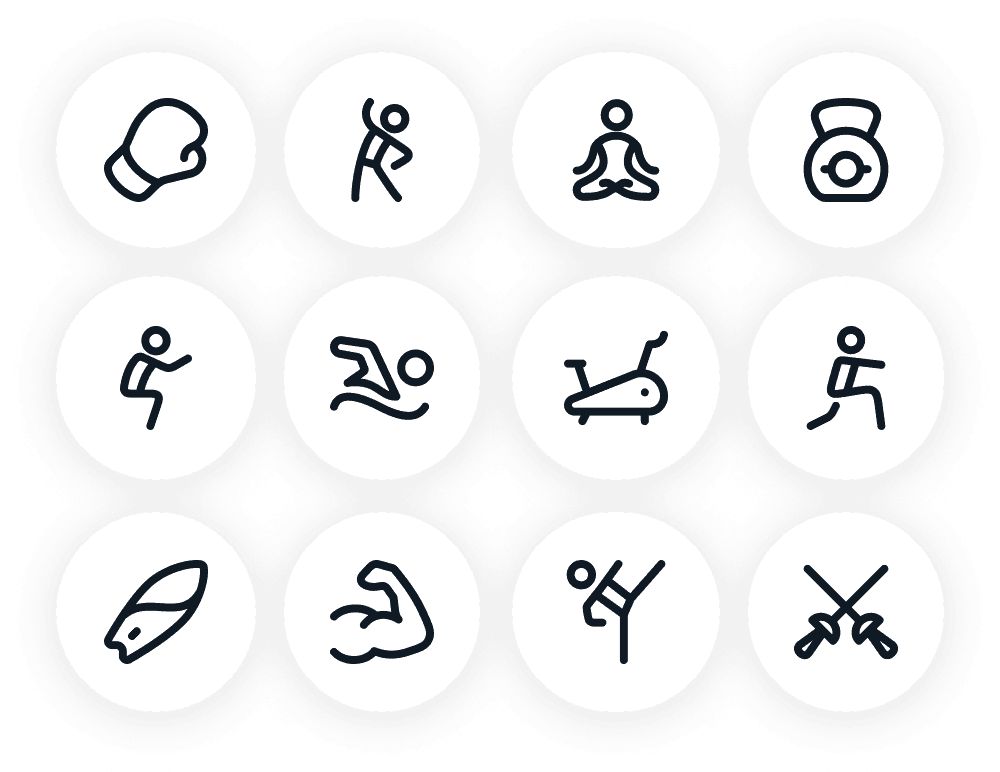
Simple and straightforward.
The icons are straightforward stick figures, but communicate their message well.
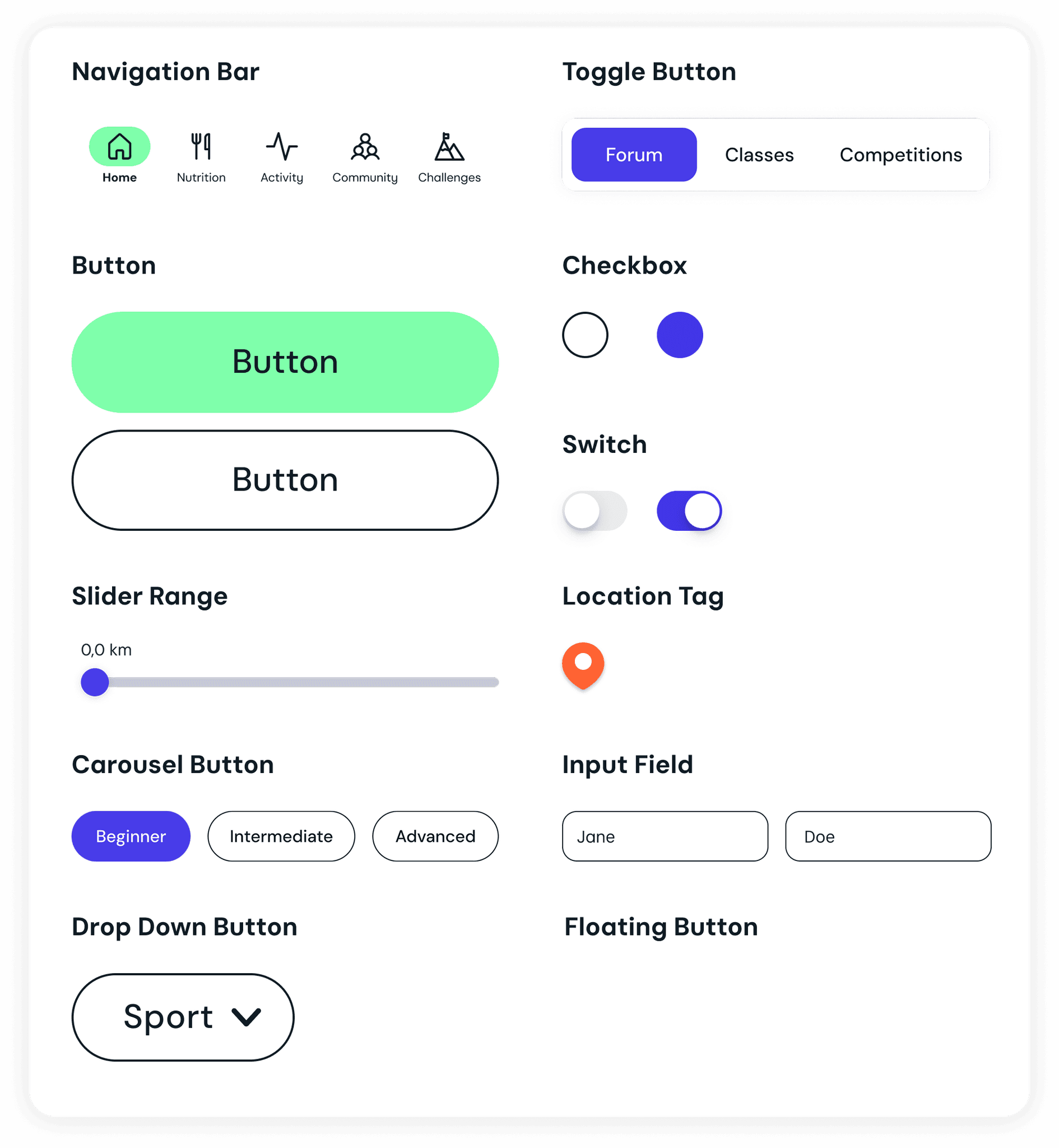
The UI elements follow the same approach: clean, consistent, and visually engaging without being overwhelming.
Simple and straightforward.
The icons are straightforward stick figures, but communicate their communication well.
The UI elements follow the same approach: clean, consistent, and visually engaging without being overwhelming.
The Evolution
The Evolution
ISSUE #5
‘Home’ screen is confusing, and lacks certain elements that the users would find useful to have.
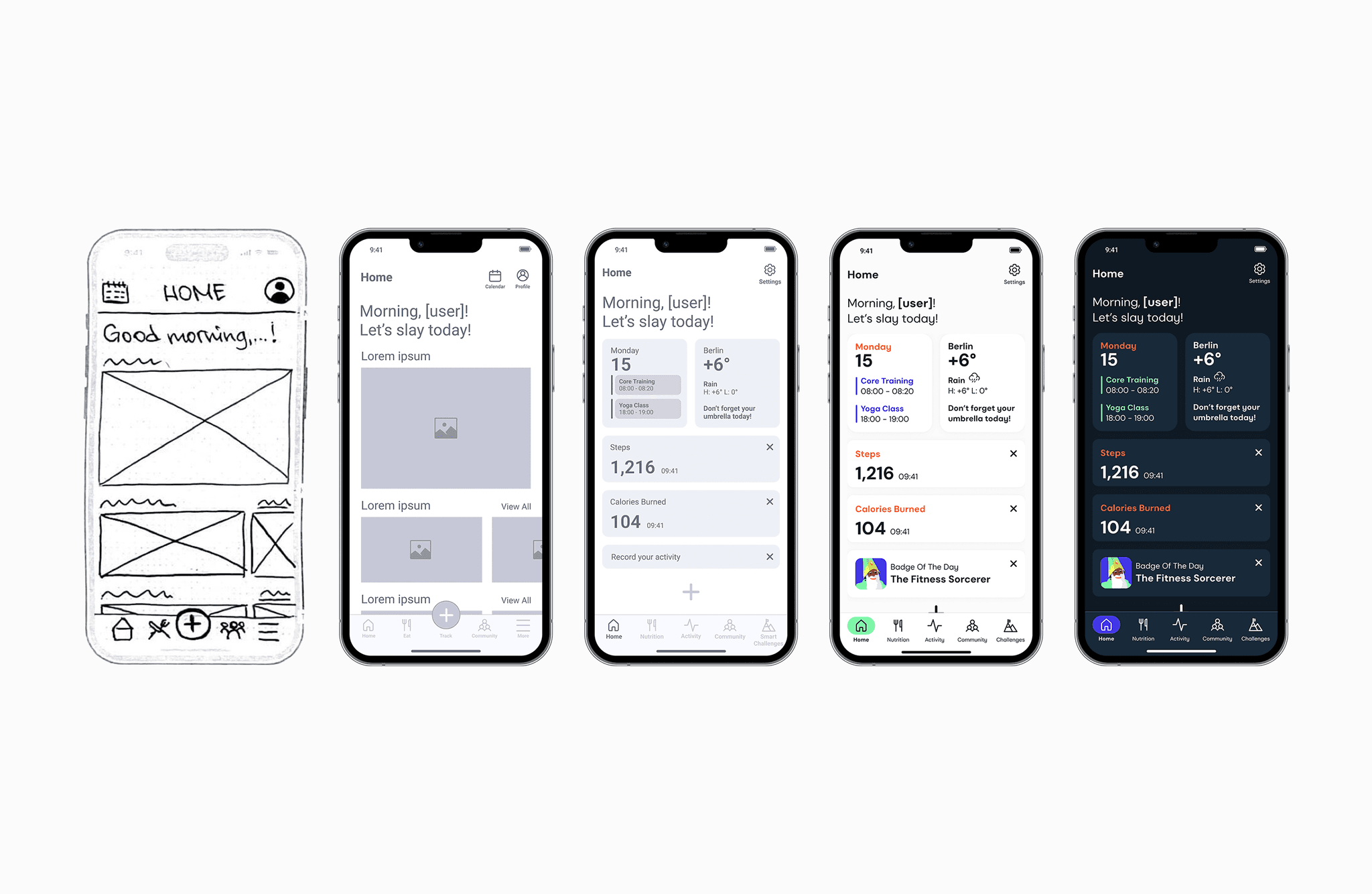
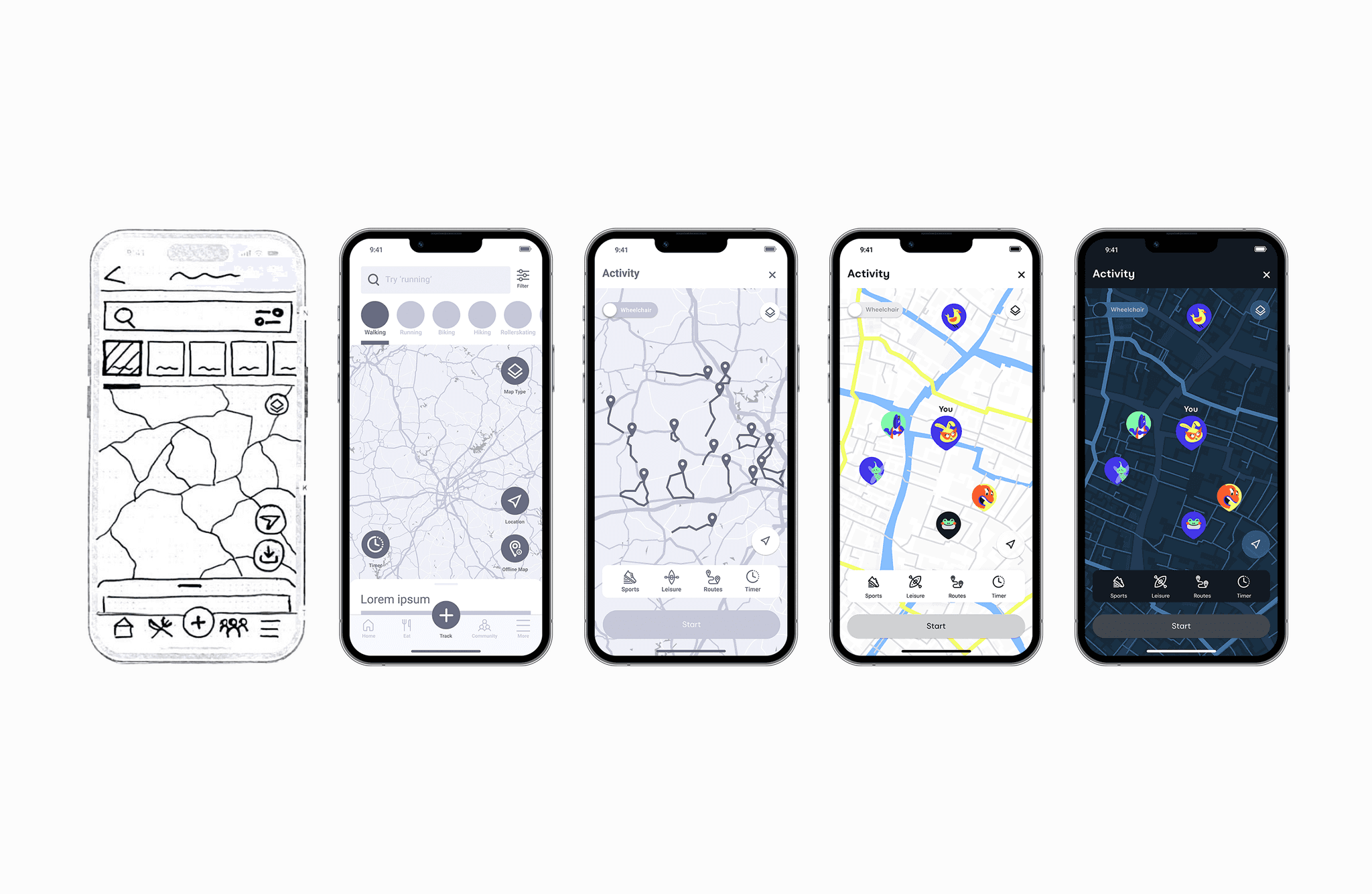
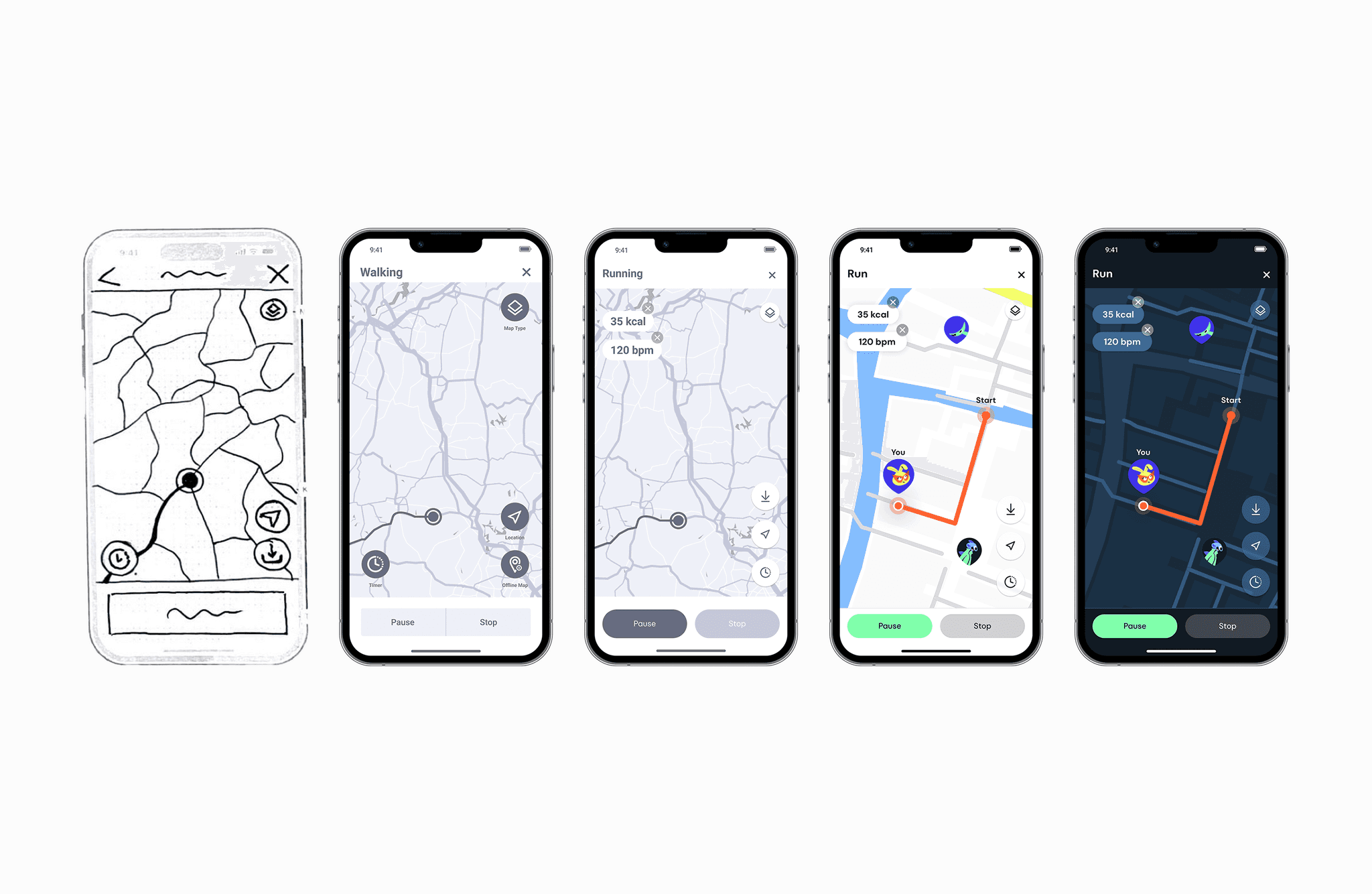
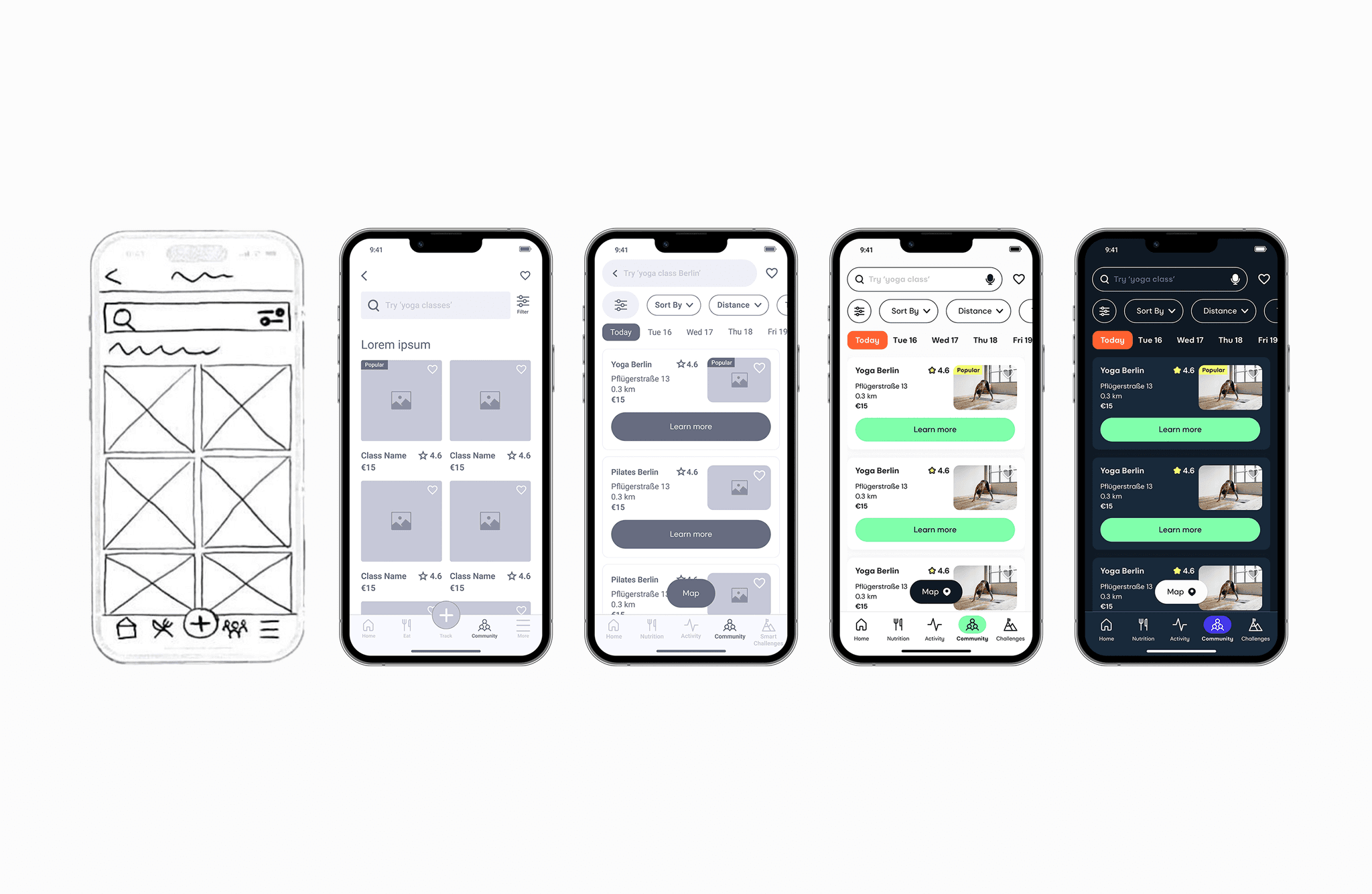
Demo Video
Demo Video
Hi-Fi Prototype
Hi-Fi Prototype
Explore Olive in Light Mode
Explore Olive in Light Mode
Explore Olive in Light Mode
Explore Olive in Dark Mode
Explore Olive in Dark Mode
Explore Olive in Dark Mode

Finale
Finale
What I Learned
What I Learned
This project was complex, time-consuming and incredibly insightful. I learned the absolute importance of early testing, which revealed major UX issues that would have been caught only in later stages, setting my timings for delivery off.
Another big lesson for me was that it's better to have a clear and personalized product than a flashy one.
This project was complex, time-consuming and incredibly insightful. I learned the absolute importance of early testing, which revealed major UX issues that would have been caught only in later stages, setting my timings for the delivery off.
Another big lesson for me was that it's better to have a clear and personalized product than a flashy one.
Impact
Impact
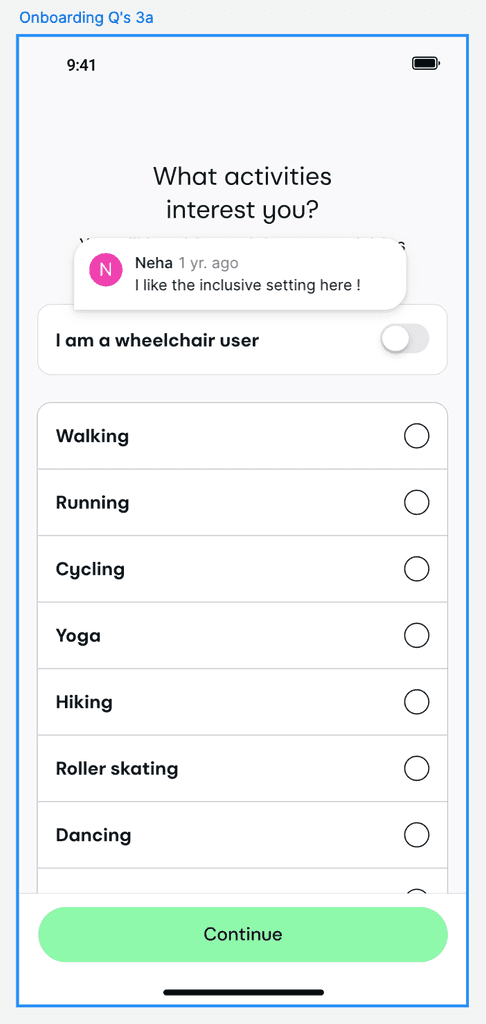
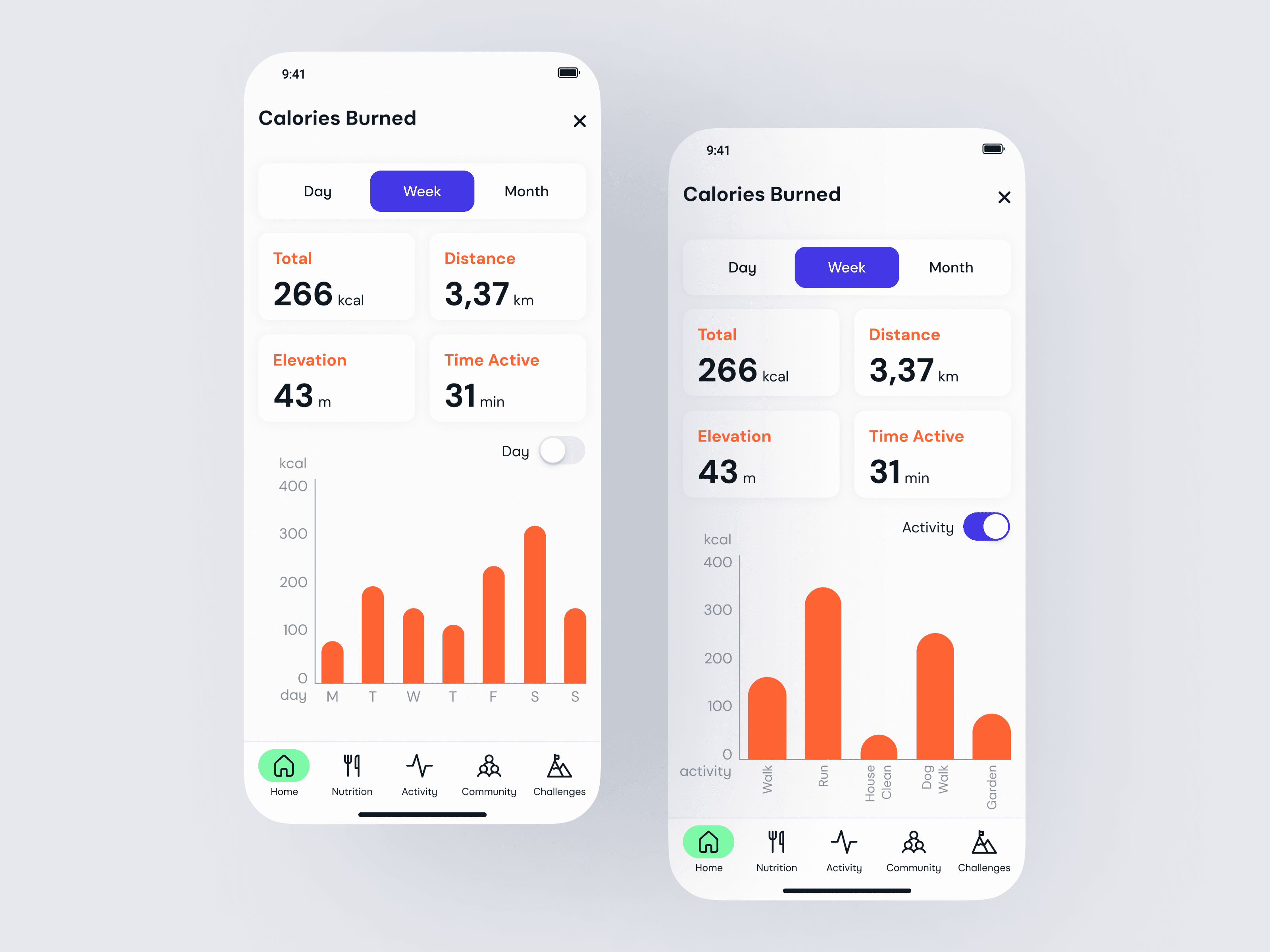
After applying the final iterations and adding Olive’s visual identity, users found the app much clearer and more engaging. Some features stood out as especially helpful, like being able to see calories and bpm in real time during activity, or spotting other users on the map while working out, which added a fun, social element to the experience.
Here's what some people said:
After applying the final iterations and adding Olive’s visual identity, users found the app much clearer and more engaging. Some features stood out as especially helpful, like being able to see calories and bpm in real time during activity, or spotting other users on the map while working out, which added a fun, social element to the experience.
Here's what some people said: